> ## Documentation Index
> Fetch the complete documentation index at: https://traceroot.ai/docs/llms.txt
> Use this file to discover all available pages before exploring further.
# Introduction
> Continuous monitoring for your AI agents
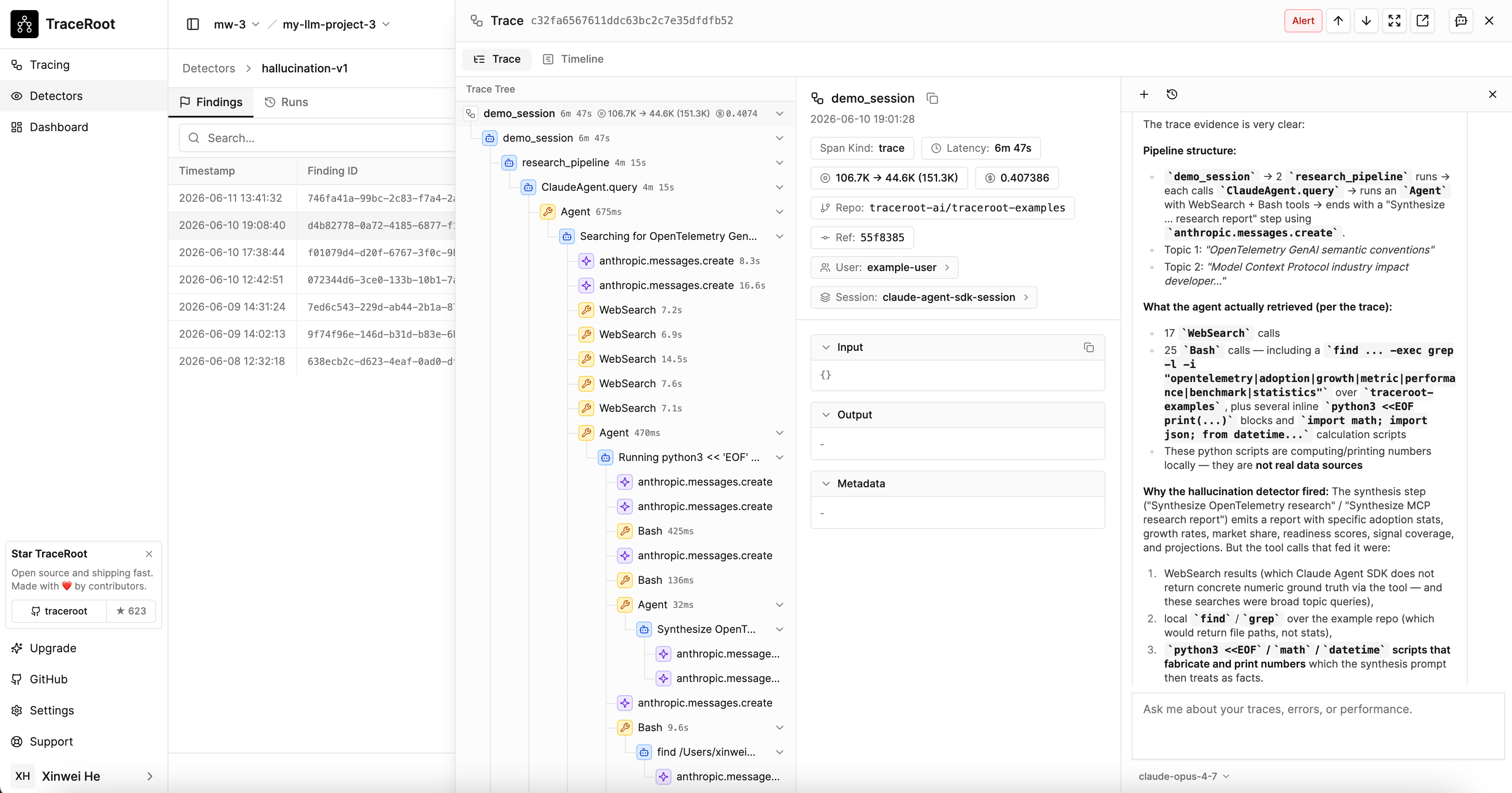
A detector is an **LLM-as-a-judge** — an evaluator model that reads each incoming trace and decides whether a specific problem is present. When the judge flags one, the TraceRoot AI agent investigates — pulling in the trace, your production source code, and recent GitHub activity — and the combined alert lands once both steps complete.
 ## Two-step pipeline
Detection runs in two stages so you pay deep-analysis costs only on real problems:
**Step 1 — LLM-as-a-judge.** Every selected trace is read by an evaluator model. The judge returns a boolean: is the problem you defined present in this trace?
**Step 2 — AI agent run.** When the judge flags a trace, the TraceRoot AI agent investigates: it downloads the trace, reads your production source code at the failure point, checks recent commits and PRs touching that file, and produces a root cause analysis with a code location and recommendation.
Each step's model is configurable. For the judge we can choose a cheaper model and for the agent we can pick a stronger model since it only runs on real findings. You can swap either to any system model or a [BYOK](/docs/ai-agent/byok) model — independently per step.
## Anatomy of a detector
A detector has four parts:
* **A prompt** — what to look for, in natural language ("does this trace contain a hallucination?").
* **A target** — which traces it runs on (every trace in the project, by default).
* **An outcome** — a boolean `identified` — was the problem present in this trace?
* **An RCA toggle** — whether the AI agent investigates this detector's findings (on by default).
When `identified` is true, the detector emits a **finding**, the AI agent investigates (when RCA is enabled — see below), and the combined alert — finding plus analysis — lands in your inbox.
## Root cause analysis
Every detector has a **Run root cause analysis on findings** toggle, available in the create sheet and the edit panel. It controls whether the AI agent (step 2) investigates the detector's findings — turn it off for a noisy detector that would otherwise incur agent-model cost on every finding. It defaults to on, and detection itself is unaffected either way: a detector with the toggle off still fires and records findings; only the downstream analysis is skipped.
RCA is decided **per trace, not per detector**. When several detectors fire on the same trace they share a single finding and a single RCA agent, and that analysis runs if **at least one detector that fired** on the trace has the toggle on. Two consequences:
* Turning a detector's toggle off only suppresses RCA when it fires alone (or only alongside other RCA-off detectors).
* When an RCA-off detector shares a trace with a firing RCA-on detector, its finding still rides along into the one shared analysis — at no extra cost, since there is only ever one agent per trace.
## Where to start
Create your first detector in a few minutes from a starting prompt.
Configure email and Slack notifications for findings.
## Two-step pipeline
Detection runs in two stages so you pay deep-analysis costs only on real problems:
**Step 1 — LLM-as-a-judge.** Every selected trace is read by an evaluator model. The judge returns a boolean: is the problem you defined present in this trace?
**Step 2 — AI agent run.** When the judge flags a trace, the TraceRoot AI agent investigates: it downloads the trace, reads your production source code at the failure point, checks recent commits and PRs touching that file, and produces a root cause analysis with a code location and recommendation.
Each step's model is configurable. For the judge we can choose a cheaper model and for the agent we can pick a stronger model since it only runs on real findings. You can swap either to any system model or a [BYOK](/docs/ai-agent/byok) model — independently per step.
## Anatomy of a detector
A detector has four parts:
* **A prompt** — what to look for, in natural language ("does this trace contain a hallucination?").
* **A target** — which traces it runs on (every trace in the project, by default).
* **An outcome** — a boolean `identified` — was the problem present in this trace?
* **An RCA toggle** — whether the AI agent investigates this detector's findings (on by default).
When `identified` is true, the detector emits a **finding**, the AI agent investigates (when RCA is enabled — see below), and the combined alert — finding plus analysis — lands in your inbox.
## Root cause analysis
Every detector has a **Run root cause analysis on findings** toggle, available in the create sheet and the edit panel. It controls whether the AI agent (step 2) investigates the detector's findings — turn it off for a noisy detector that would otherwise incur agent-model cost on every finding. It defaults to on, and detection itself is unaffected either way: a detector with the toggle off still fires and records findings; only the downstream analysis is skipped.
RCA is decided **per trace, not per detector**. When several detectors fire on the same trace they share a single finding and a single RCA agent, and that analysis runs if **at least one detector that fired** on the trace has the toggle on. Two consequences:
* Turning a detector's toggle off only suppresses RCA when it fires alone (or only alongside other RCA-off detectors).
* When an RCA-off detector shares a trace with a firing RCA-on detector, its finding still rides along into the one shared analysis — at no extra cost, since there is only ever one agent per trace.
## Where to start
Create your first detector in a few minutes from a starting prompt.
Configure email and Slack notifications for findings.