
traceroot does not auto-instrument Tavily and does not know your plan’s price. You trace the search with
observe and report its cost yourself, and traceroot stores the cost you report. See Tool and API calls for how reported costs add up.Install
- Python
- TypeScript
traceroot 0.5.0 or later, or @traceroot-ai/traceroot 0.7.0 or later.
Set up
Initialize traceroot once at startup. No integration flag is needed: theobserve wrapper in the next step traces the search.
- Python
- TypeScript
Usage
Tavily bills in credits, and a credit’s dollar price depends on your plan. It returns the credits a search used when you ask for usage. To record the cost:- Wrap the search in a function traced as a tool span (
type="tool"). - Ask for usage with
include_usage=True(includeUsage: truein TypeScript) and read the credits used. - Multiply by your price per credit and report it with
update_current_span(cost=...)(updateCurrentSpanin TypeScript) while that span is open.
- Python
- TypeScript
web_search from your agent like any other function. Its span nests under the span that called it, and its cost adds to that trace’s total.
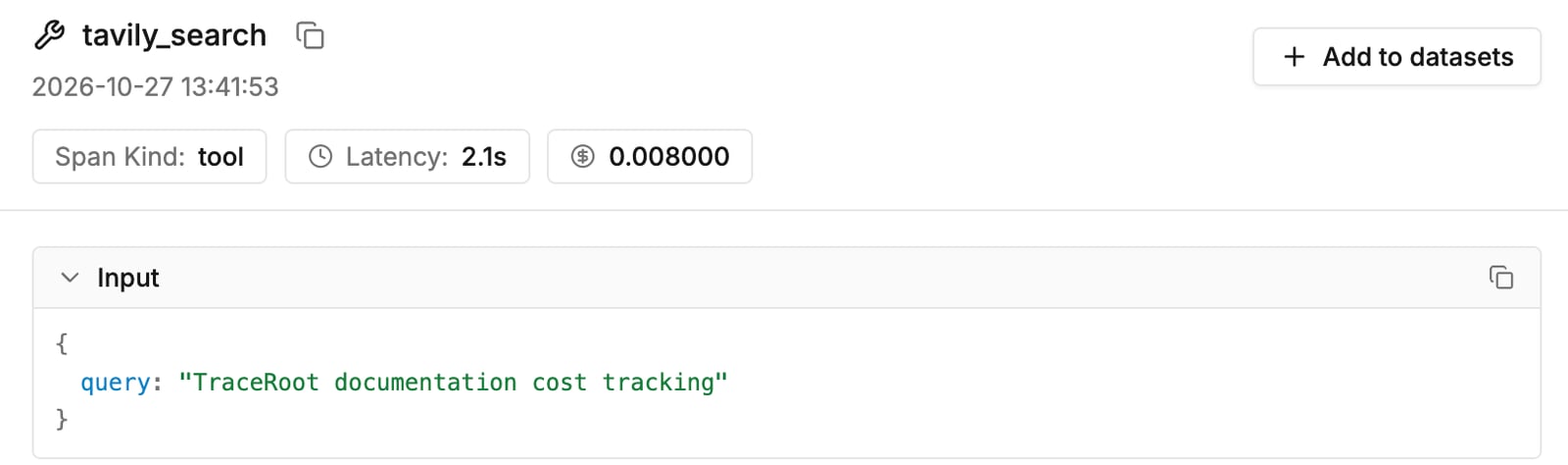
One credit at the plan rate on the tool span
Verify
Run your code and confirm the trace arrives:- In the traceroot UI: Navigate to Tracing > Traces in traceroot Cloud. You should see a
tavily_searchspan, at the root or under your agent’s span. Open it to see its cost; the trace’s total cost includes it. - Via the CLI: Run
traceroot traces listto inspect your recent traces from the terminal.
What gets captured
Limitations
- Tavily returns credits only when the search asks for usage; without it the span records no cost.
- Set
PRICE_PER_CREDITto your own plan’s rate.
Next steps
Python SDK Reference
Explore the full Python SDK reference and instrumentation options.
Credits or quota
Report credits used at your plan’s price per credit