
- Python
- TypeScript
How It Works
- Auto-instrumentation — traceroot integrations capture token usage from the provider response automatically.
- Fallback estimation — When token counts aren’t in the response, traceroot estimates using tiktoken.
- Model matching — The reported model ID is matched against traceroot’s pricing table, including supported provider-prefixed and hosted aliases.
- Cost calculation — When a match exists, token counts are multiplied by that entry’s prices. An unmatched model still records tokens but has no calculated cost unless you report one.
- Reported cost — If the span carries a cost you reported, it is stored in place of the calculated cost from step 4. Tokens are unchanged.
Pricing coverage
Pricing entries currently cover these model families:- OpenAI
- Anthropic, including supported model IDs routed through Amazon Bedrock and Claude 3.x model IDs on Google Vertex AI
- Google Gemini
- xAI
- DeepSeek
- Moonshot (Kimi)
- Z.AI (GLM)
- TypeSafe AI (JEV)
What Gets Tracked
Each LLM span captures:Viewing Costs
In the dashboard, costs are visible at both the span and trace level:- Per span — see the cost of each individual LLM, tool or API call
- Per trace — see the total cost aggregated across all calls in the trace
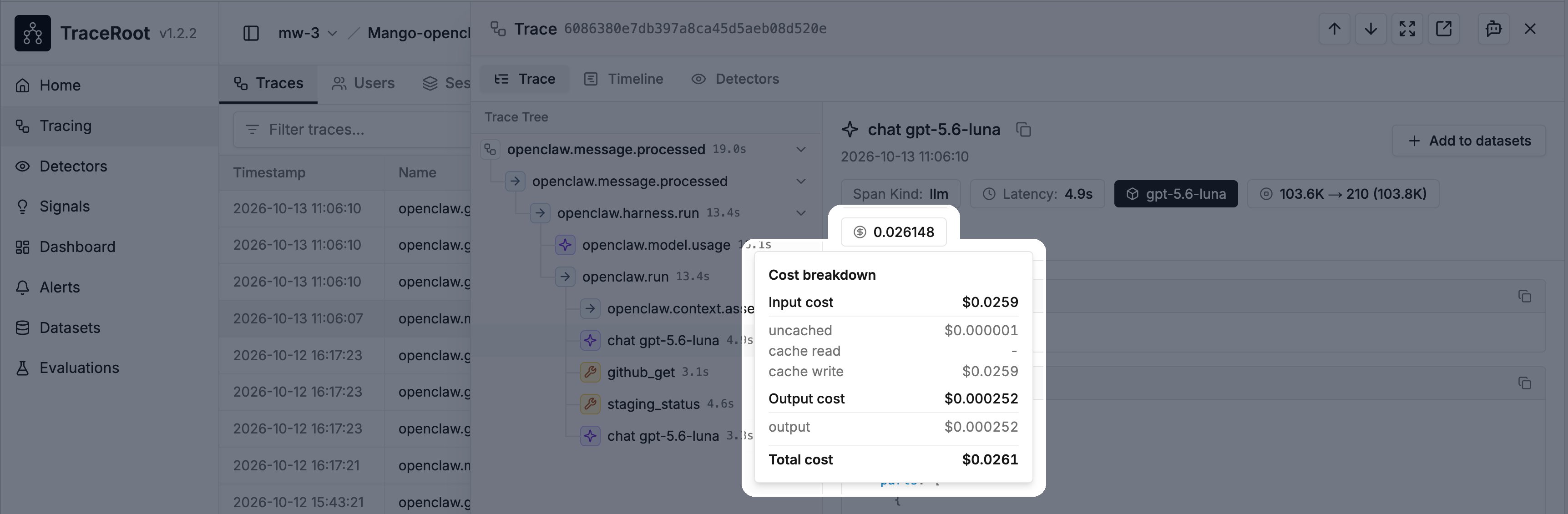
Span cost: cost chip and its input and output cost breakdown
Manual Token Reporting
For custom or unsupported providers, report token usage manually:- Python
- TypeScript
Usage keys differ by language:
In Python, use
input_tokens and output_tokens (and reasoning_tokens, cache_read_tokens, cache_write_tokens).
In TypeScript, use input, output, cacheRead, cacheWrite, and total.Report cost directly
When you already know what a call cost (a negotiated rate, a gateway’s bill, an unpriced model), report it with the usage:- Python
- TypeScript
Requires the Python SDK
traceroot 0.5.0 or later, or the TypeScript SDK @traceroot-ai/traceroot 0.7.0 or later.0 is accepted and sets the span’s cost to zero. Reporting a total on a parent span whose child spans are also priced counts the cost twice. Tokens are still recorded. The per-category cost breakdown is shown only when it matches the computed price, so a different reported cost hides it for that span and its trace. The cost is read from the OpenInference llm.cost.total attribute, so an OpenInference instrumentor that sets it is picked up automatically.
Tool and API calls
A paid tool or API call takes a cost the same way, with no model or token usage needed. Tools bill in different ways, so first work out the dollar amount for the call, then report it on the tool’s own span. The cost counts toward the trace total.Price in the response
Some providers, such as Exa, return the dollar cost of each request. Pass it through; the Exa page shows the code. Some providers settle the price after the call returns. Apify, for example, recommends reading a run’s cost again about 10 seconds after it finishes. Report the settled value.Fixed price per call
When every call costs the same, report your price on each call. A retry is another call and gets its own cost. traceroot records the cost you report, so report it for every response your provider bills. PredictLeads, for example, bills a lookup that returns no data yet but not a rejected one.Credits or quota
Some providers bill in credits, and a credit’s dollar price depends on your plan. Tavily returns the credits a search used when you ask for usage.Time used
Some tools bill by time, such as a remote browser billed per minute. Time the session and multiply by your price per minute, and report it in afinally block so a failed session is still billed. This is an estimate: the provider bills from its own usage records, which can run a little longer. TinyFish browser sessions work this way.