Catching a wrong revenue explanation with Detectors
An answer that crosses no alert threshold. A TraceRoot Detector, an LLM-as-a-judge check written in plain English, catches it in production and opens a Signal.
 Xinwei HePublished
 Alerts are good at failures that look like failures. Latency over a limit, an error rate climbing, token use spiking: each one is a number crossing a line, and a deterministic rule catches it every time.
The run from the previous post crossed no line. A LangGraph SQL agent explained a $200 MRR drop with the right total and the wrong reason: it blamed cheaper new customers, when two downgrades were most of the loss. The query came back in milliseconds, nothing errored, and the answer read well. We caught it by hand, by checking the customer records the agent cannot see. That works for ten traces. It does not work for ten thousand, and that is the problem this post is about.
The failure is in the meaning of the output, and a threshold cannot read meaning. Today, the way most teams find runs like this is a user complaint, followed by someone reading traces until they find the bad one.
An alert is a deterministic rule. A detector is a judgment, and you need both. This post writes that judgment down for the MRR case, runs it on the faulty and the corrected run, and shows what came back.
Give the detector something to compare against
The query and returned rows in the previous post agree with each other. A judge reading only those rows has nothing to disagree with.
The recorded demo includes an independent audit span for this comparison. After the agent answers, a function reads the original subscription records, works out each customer's plan at both month ends, and compares the result with what the reporting view said, customer by customer. It writes the comparison into the trace as warehouse.audit_mrr_movements: the two customers whose plan change was split into a churn and a new signup, five pass-or-fail checks on the report, and the SQL that defines the view.
The agent never sees this span. It runs after the answer, outside the prompt, and the root span records the outcome next to the answer as warehouse_checks_passed: false. The audit does not change the agent’s prompts or tools.
That is the general rule. A detector can only judge what is in the trace. When the evidence that proves an answer wrong lives somewhere else, record it, and record it after the answer so the agent cannot lean on it.
Write the detector
In TraceRoot, a detector is a plain-English description of a problem that a judge model checks production traces for: an LLM-as-a-judge check that runs on live traffic instead of a benchmark. You write the problem down the way you would explain it to a colleague who is about to read traces for you. When a trace matches the description, the detector fires.
For the MRR case, ours reads:
Check the agent's explanation of the monthly MRR change against the independent customer records in
warehouse.audit_mrr_movements. Flag an answer that misattributes the change to churn, new customers, upgrades, or downgrades. Compare the reported movement categories with the customer snapshots, not just the net total: a matching total does not establish correct attribution. Use only the evidence in this trace. Do not flag a correct explanation solely because an earlier reporting table was wrong. If customer evidence is absent, do not assume the explanation is wrong.
Three things in that prompt do the work. It names the span to compare against, so the judge knows where the evidence is. It says what counts as wrong: the categories, not the total. And it says when not to fire: a correct explanation after a bad table, or a run with no audit at all.
That is the question we answered in part 1 by hand, written down once so it runs on the traces selected by the detector’s filter and sampling rate.
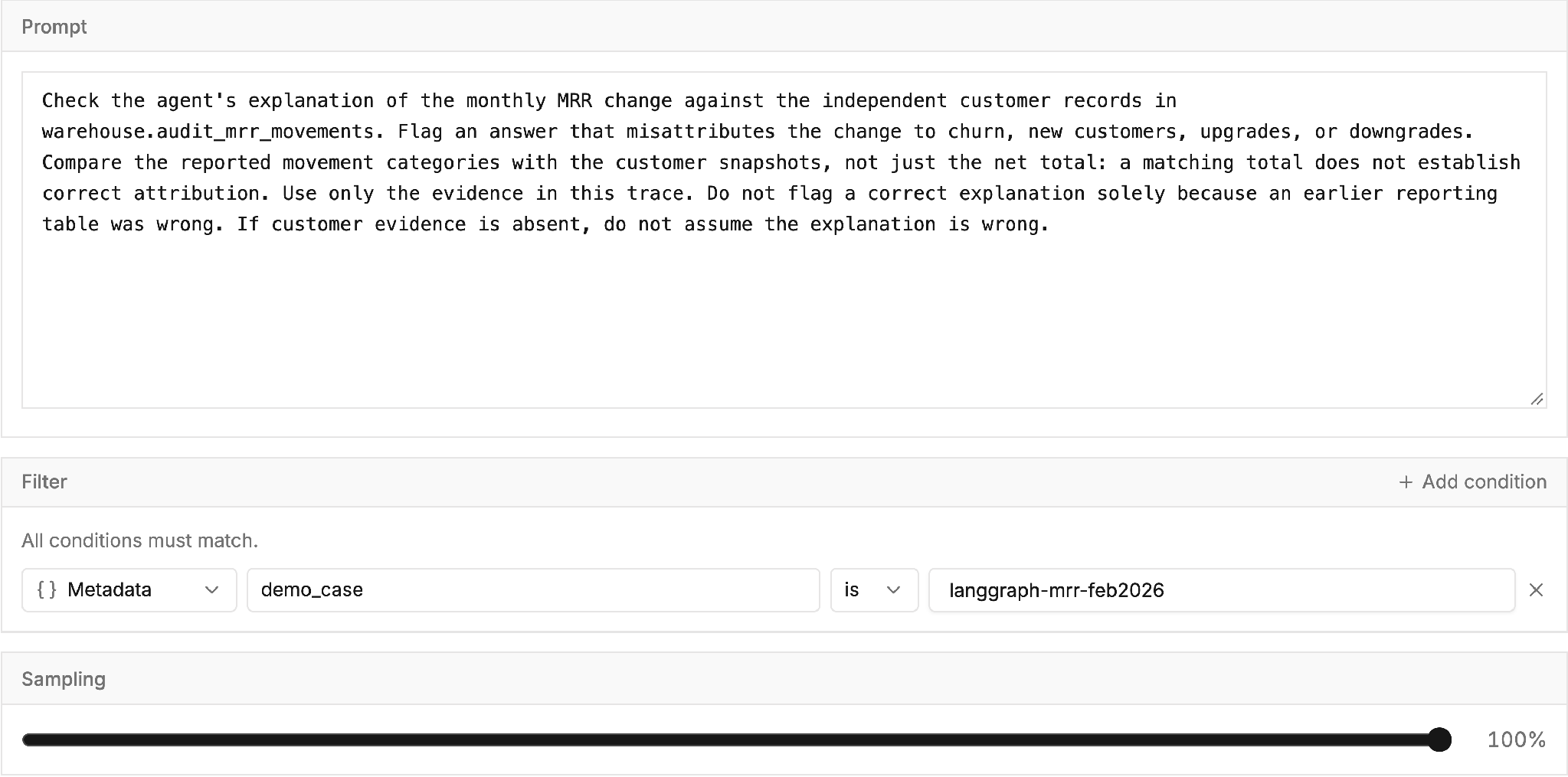
The detector's prompt, filter and sampling as saved.
We started from the Logic Error template, which adds a severity and an error description to each finding, and kept the TraceRoot-provided judge model. The filter limits the detector to traces tagged demo_case = langgraph-mrr-feb2026, so it reads only this case. Sampling is 100% because there were two runs to check; the default is 25%, and on real traffic that is where to start. Generate signals is on, with root cause analysis set to Automatic.
What happened when it ran
About a minute after a trace's last span arrives, the detector's judge model reads the trace and answers yes or no: is the problem you described present in this run?
On the faulty run, the judge answered yes and recorded this finding:
The answer misattributes the $200 decline: independent customer snapshots show 2 churned customers (-$198), 2 new customers (+$398), and 2 contractions (-$400), not 4 churns and 4 new customers with no contractions.
On the corrected run, the same detector answered no. Both rows show Completed; the second has no summary because there was nothing to report.
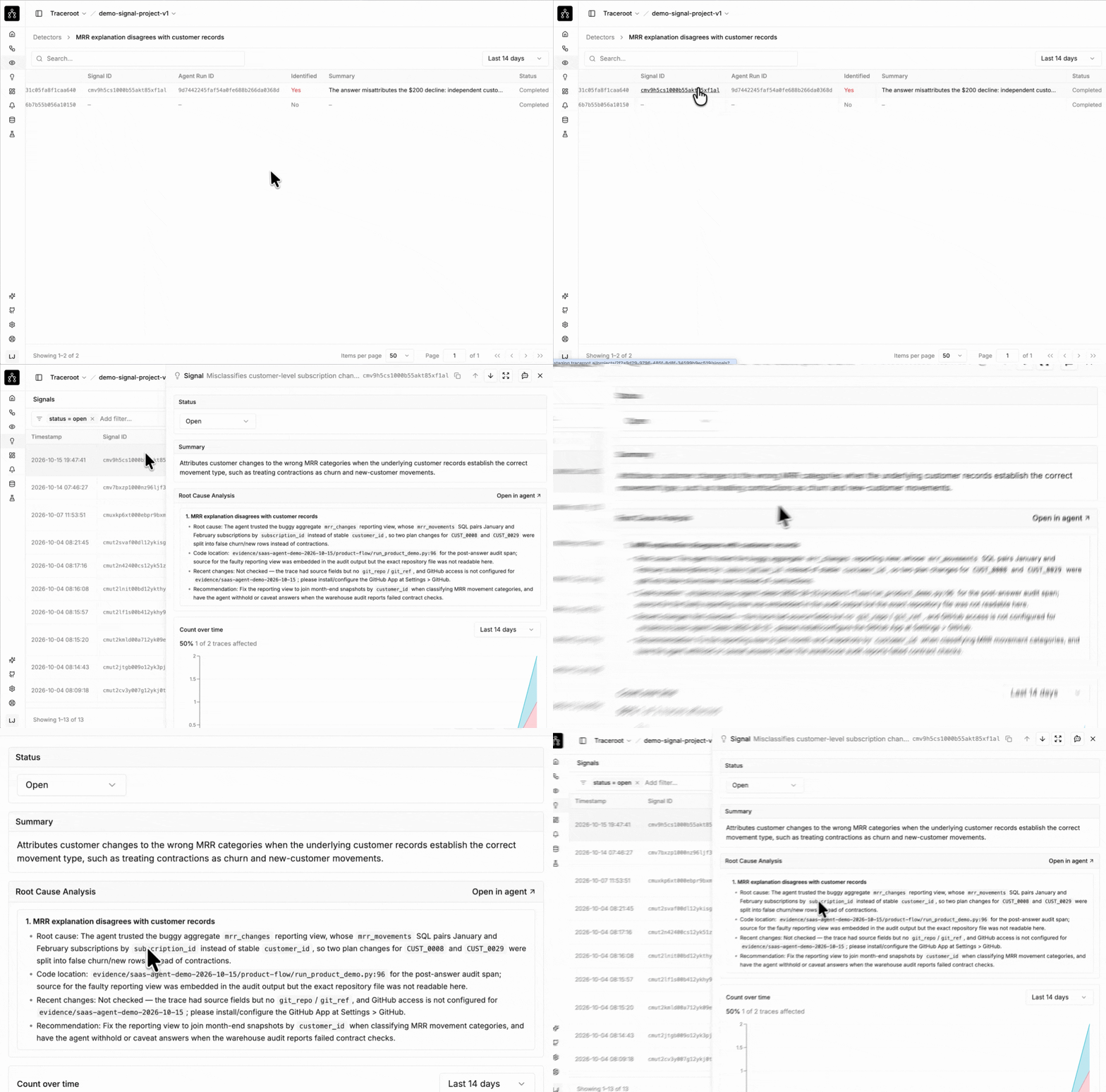
The detector's two runs, then the Signal the finding opened.
When the judge says yes, its finding joins a Signal: one entry that groups recurring findings of the same problem. Here the finding opened a Signal named "Misclassifies customer-level subscription changes as different MRR movement categories".
With Automatic root cause analysis enabled, the TraceRoot Agent investigates one trace when a new Signal opens. A reopened Signal gets a new analysis if the previous one is more than 24 hours old. Later findings of the same problem join that Signal and share its analysis. The Signal page shows the summary, affected traces over time, and the completed root cause analysis. Slack and email notifications are sent for new or reopened Signals; additional findings in an open Signal do not each trigger a notification.
Splitting the work across two models keeps online monitoring affordable. Reading every production trace with a heavy reasoning model would spend almost all of your budget confirming that healthy runs are fine. The judge model is built to screen runs cheaply, saving the deeper agent investigation for problems the judge has already flagged. Both models can run on your own keys (the judge model is set per detector, and the agent model once per project). For the trade-offs behind this design, see Catching agent failures with Detectors and Signals.
Treat a flag as a suspect, not a verdict. A vague prompt produces vague findings, and even with a sharp prompt, a judge model can misread a trace that is fine. Here the judge has compared the answer with the audit span, but it has not worked out why the reporting view was wrong. That is why a flag leads to an investigation rather than straight to a fix.
Writing your first detector
1. Pick the failure you already look for
Start with the problem you keep searching traces for by hand. If you have read traces for the same kind of bad answer three times, that is your first detector.
2. Describe what wrong looks like, for your agent
Write the prompt in terms of your tools and your data. A generic "check for hallucinations" does not know which refusals are correct for your support agent, or which empty results your search tool is allowed to return. "Compare the explanation with the customer records in warehouse.audit_mrr_movements" does.
3. Test it on runs you already know
Before you trust a new detector, run it against a few traces you know are bad and a few you know are fine. If it misses the bad ones or flags the good ones, tighten the prompt now rather than after a week of noisy findings. Here, that pair was the faulty run and the corrected one.
4. Turn it on and read the first Signals
Choose the judge model, decide whether root cause analysis runs automatically or only when you trigger it, and let it run on live traffic. Read the first Signals closely, along with the findings inside them. They tell you as much about your prompt as about your agent.
Takeaway
- Keep your deterministic alerts for failures that cross a numeric threshold, and write a detector for semantic failures you keep finding by hand.
- Put the evidence the judge needs into the trace, after the answer, so the agent cannot lean on it.
- Write the detector prompt in terms of your own spans, tools, and data, then test it on known good and bad runs.
- Treat each flag as a suspect, and read the Signal's root cause analysis before changing code.
Next: Debug
A Signal tells you that a problem keeps happening. The next post covers how to find out why: reading the Signal's root cause analysis, checking the join it blames against the customer records, fixing the reporting view, and running the agent again.
In this series, From trace to fix:
- Tracing a silent failure in a LangGraph SQL agent
- Catching a wrong revenue explanation with Detectors (this post)
- Fixing the reporting query behind the agent's answer
- Testing a LangGraph SQL agent fix with a regression eval
TraceRoot is open source. Detectors run on every plan, including the free one; the quickstart gets tracing onto your own agent in a few minutes, the repository has the self-hosted version, and Discord is where the team answers questions.
Tell us what your first detector looked for, and whether it caught what you expected, on GitHub or Discord.
Further reading
- Catching agent failures with Detectors and Signals
- Detectors and Signals in the TraceRoot docs
- Tracing a silent failure in a LangGraph SQL agent, part 1 of this series