Fixing the reporting query behind the agent's answer
Root cause analysis for a LangGraph SQL agent's wrong answer: the Signal points at a join on subscription_id. We verify it, change both joins and rerun the agent.
 Xinwei HePublished
 A flag tells you what went wrong. It does not tell you why, and the why is rarely in the trace alone.
In the previous post, a Detector flagged the run we have been following: a LangGraph SQL agent explained a $200 MRR drop as cheaper new customers replacing churned ones, when two existing customers had downgraded. The finding opened a Signal, and the Signal's root cause analysis ran on its own. This post reads that analysis, checks it against the customer records, fixes the reporting view it blames, and runs the agent again.
From a flag to the code behind it
The trace shows that the report counted each downgrade as a churn and a new customer. It does not show why the report did that. The cause usually lives in the code around the call: a prompt template that reshapes a tool result, a parser that drops a field, or, as in this case, the SQL behind the view the agent queried.
Finding that cause by hand means copying details from the span into your editor, searching the repo for the view name, and working out which version of the code was deployed when the trace ran, because main has often moved since. Then you dig through recent commits to see what changed. For an agent, root cause analysis means reading the trace and the code that produced it together, at the commit that was running, until you can answer two questions: where did it break, and which change introduced it?
This run answered the first question and stopped before the second. The next section shows why.
Read the Signal's analysis
With automatic root cause analysis enabled, TraceRoot analyzes a new Signal. Ours had finished by the time we opened the Signal page.
The analysis points at mrr_movements, the view behind the mrr_changes report the agent queried. It identifies the join on subscription_id and explains how that join splits a plan change into a churn row and a new-customer row.

Excerpt from the Signal's analysis, identifying the join on subscription_id in the SQL recorded by the audit span.
It got the SQL from the trace. The audit span from part 2 records the view's definition next to the customer comparison, and the analysis read it there. What it could not do is say when the join changed: the run had no repository or commit attached, so the analysis names the cause in the SQL and stops there.
Check the diagnosis against the records
Treat an automated diagnosis the way you treat a detector flag: verify that the span and SQL it quotes match what ran before changing code.
We checked the claim against the subscription history. Each plan version has its own subscription_id, a start date, and an end date, while the customer's customer_id stays the same across versions. For CUST_0008, January's active version was SUB_000013, an Enterprise plan at $299 a month. On February 14, the customer moved to Pro at $99, recorded as SUB_000014.
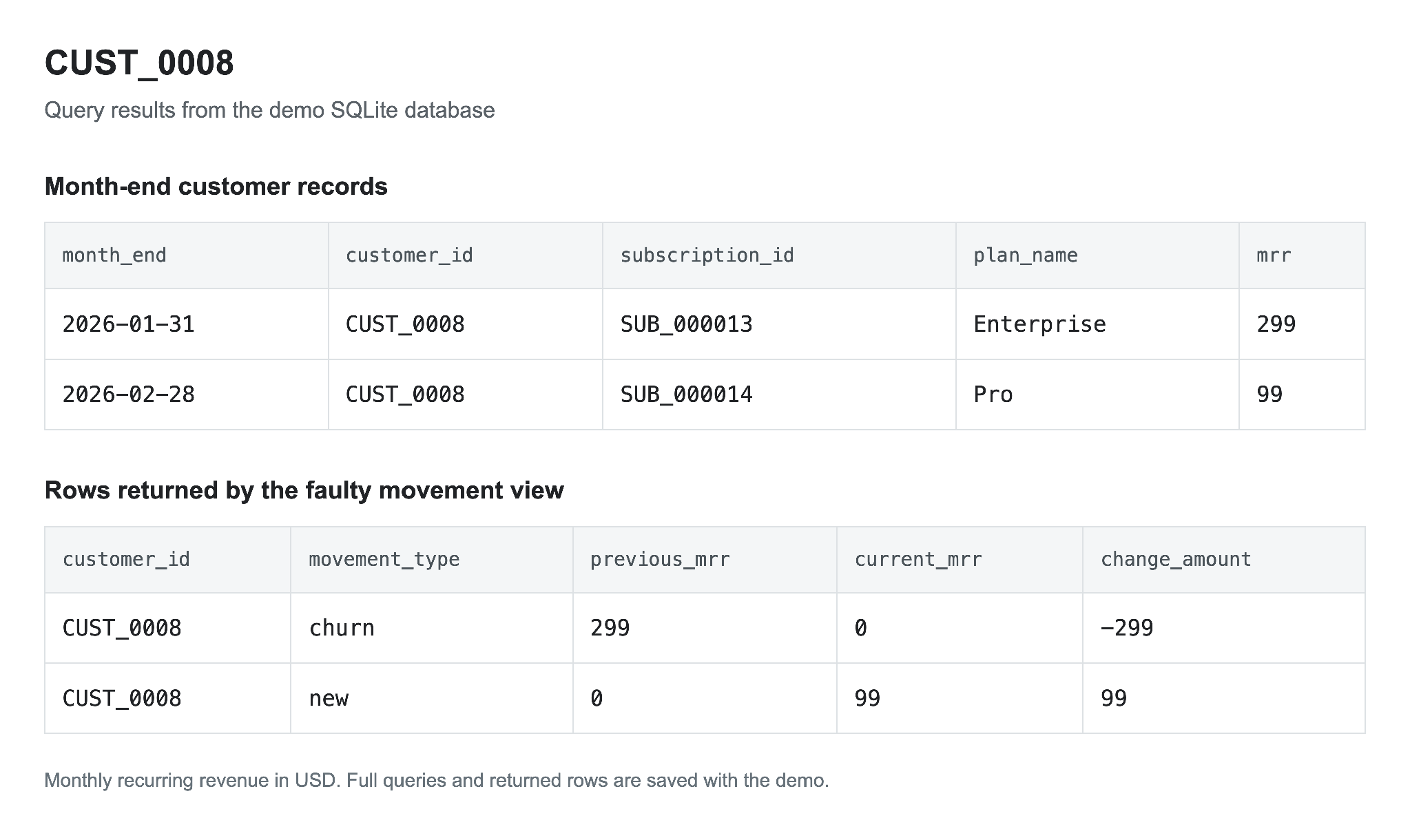
Month-end records for CUST_0008 and the two movement rows the faulty view produced for them.
The faulty view joins the two month-end snapshots on subscription_id. January's version has no February match, so the report treats its $299 as churn. February's version has no January match, so the report treats its $99 as new revenue. The same thing happened to CUST_0029. Together, the two accounts inflated churn by $598 and new revenue by $198. The difference is -$400, the exact contraction that should have appeared in the report.
Change both sides of the join
The movement view uses two left joins: one starts from January's customers, and the other adds February customers with no January match. Both have to match on customer identity:
 FROM previous p LEFT JOIN current c
-  ON p.subscription_id = c.subscription_id
+  ON p.customer_id = c.customer_id

 FROM current c LEFT JOIN previous p
-  ON p.subscription_id = c.subscription_id
+  ON p.customer_id = c.customer_id
 WHERE p.customer_id IS NULL
With that change, CUST_0008 produces one movement row: previous MRR $299, current MRR $99, change -$200. The existing classification rule labels it contraction, because both months have positive MRR and February’s amount is lower. The join relies on the monthly snapshot holding one row per customer per month, which we verified in the source data before using customer_id as the key.
Run the agent against the corrected view
We reran the same LangGraph agent with the same question, prompts, model configuration, and aggregate views. The join was the only change between the two databases.
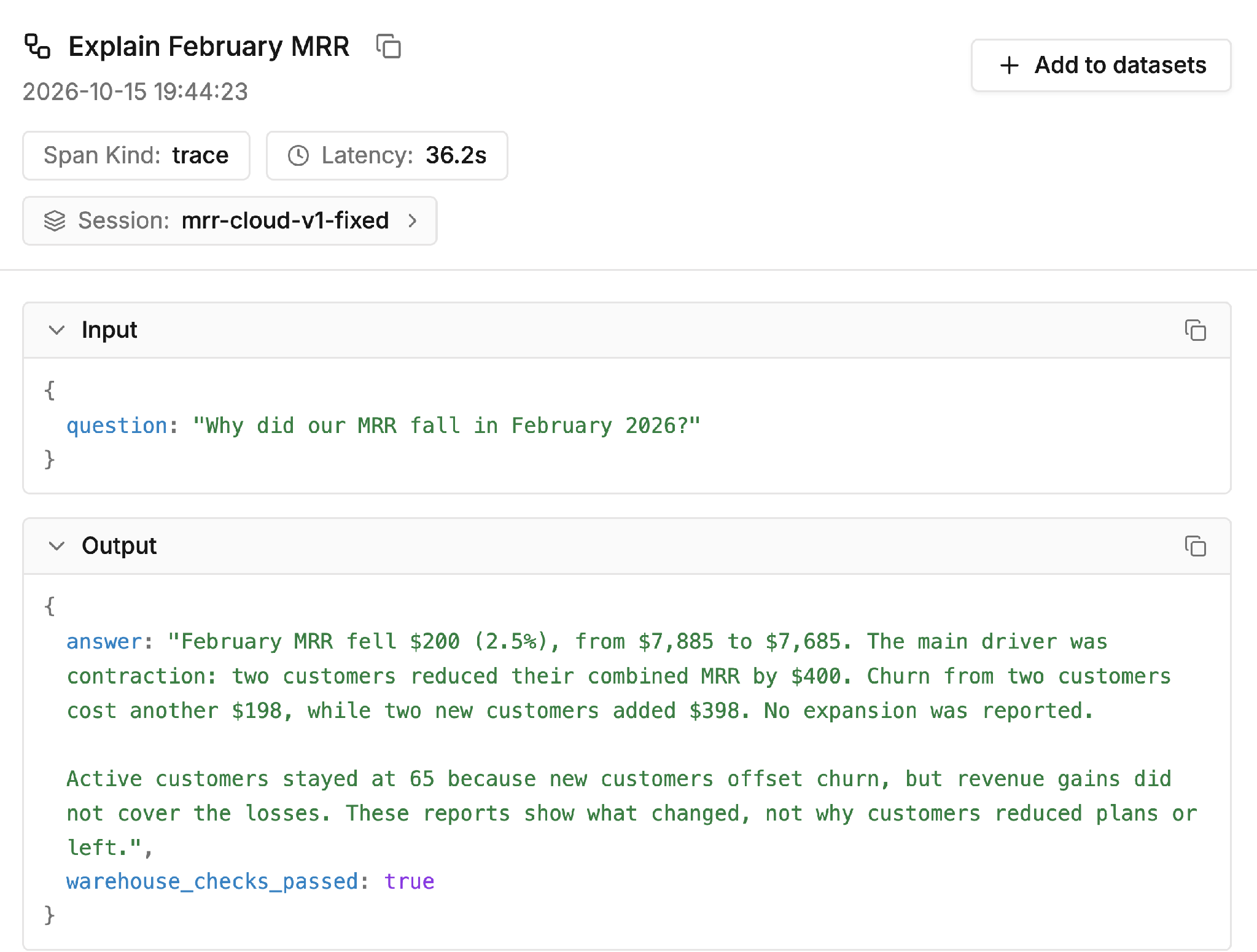
The corrected run names contraction as the largest contributor to the decline.
The new answer names contraction as the largest contributor, $400 across two customers, while keeping the $200 net decline and 65 active customers. The audit span from part 2 passed all five checks this time, and the Detector answered no.
What the analysis does with a repository
With the GitHub integration connected and access granted to the repository, the investigation uses the repository and deployed commit SHA recorded in the trace’s git context to clone that version into a separate sandbox. It reads the trace data, opens the file and line behind the span, and inspects the recent commits and pull requests that touched that code. That avoids debugging last week's failure against code that has changed twice on main since.
The agent can also open a pull request with a proposed fix. Because an investigation is still a coding agent reading logs and code, and because some failures come from upstream data or provider slowdowns rather than a code diff, the pull request is a proposal, and a person on your team reviews and merges it.
Doing it yourself from the terminal
You can run the same kind of investigation locally with your own coding agent. The TraceRoot CLI exports a trace to disk, including its git context and the detector finding if one fired:
# Export one trace to a folder
traceroot traces export <trace-id> --output ./trace-857f4934

# Writes trace.json, spans.json, git_context.json, manifest.json
# and finding.json when a detector flagged the trace
Open Claude Code or Codex next to your repository, point it at the exported folder, and ask which join produced two movement rows for CUST_0008. If you prefer to stay in the browser, the agent inside the TraceRoot app answers questions about your traces in plain language.
Takeaway
- Start from the Signal and its flagged trace, and verify the spans and SQL it quotes against your data before changing code.
- Fix the cause where it lives. Here that was two joins in a reporting view, not the agent's prompt.
- Rerun the same agent against the fix and check both the new answer and the detector result.
- Record the repository and deployed commit SHA so root cause analysis can inspect the version that ran and the relevant changes.
Next: Evaluate
One passing rerun is only half the job. The next post covers how to turn this failure into a saved test case, and how to check every future change against it before it ships.
In this series, From trace to fix:
- Tracing a silent failure in a LangGraph SQL agent
- Catching a wrong revenue explanation with Detectors
- Fixing the reporting query behind the agent's answer (this post)
- Testing a LangGraph SQL agent fix with a regression eval
TraceRoot is open source. The quickstart gets tracing onto your own agent in a few minutes, the repository has the self-hosted version, and Discord is where the team answers questions.
Tell us how you track a bad run back to the code today, and where it takes the longest, on GitHub or Discord.
Further reading
- Root cause analysis, GitHub integration and git context in the TraceRoot docs
- The TraceRoot agent: ask your traces what changed
- TraceRoot CLI: talk to your traces from your coding agent
- Catching a wrong revenue explanation with Detectors, part 2 of this series