Testing a LangGraph SQL agent fix with a regression eval
An agent evaluation tutorial in TraceRoot: both runs report the same total, and four code checks on one saved case tell the faulty and corrected runs apart.
 Xinwei HePublished
 In the previous post, we fixed the join behind the agent's wrong answer and ran the agent again. The usual next move is to run the agent once on the input that failed, see the right answer, and merge. That feels like testing. For an agent, it mostly is not.
Both runs in this series report that MRR fell by $200. A test that checks only that number passes the faulty run and the corrected one alike. To keep the fix, the test has to check the explanation: the customer movements behind the number.
Because agents are non-deterministic, the same input can yield a different response tomorrow, and a database fix can quietly break queries that worked yesterday. Answering whether a fix holds reliably without regressions requires frozen test cases you can run repeatedly.
Save the case with its expected breakdown
The failure from part 3 is the most valuable test case you have, because you know precisely what the correct output looks like. We saved it into a dataset named February MRR attribution: the prompt, the reporting period, and the expected movement breakdown derived from the raw subscription records ($400 lost to contraction, $198 lost to churn, and $398 gained from new customers, alongside the monthly totals).
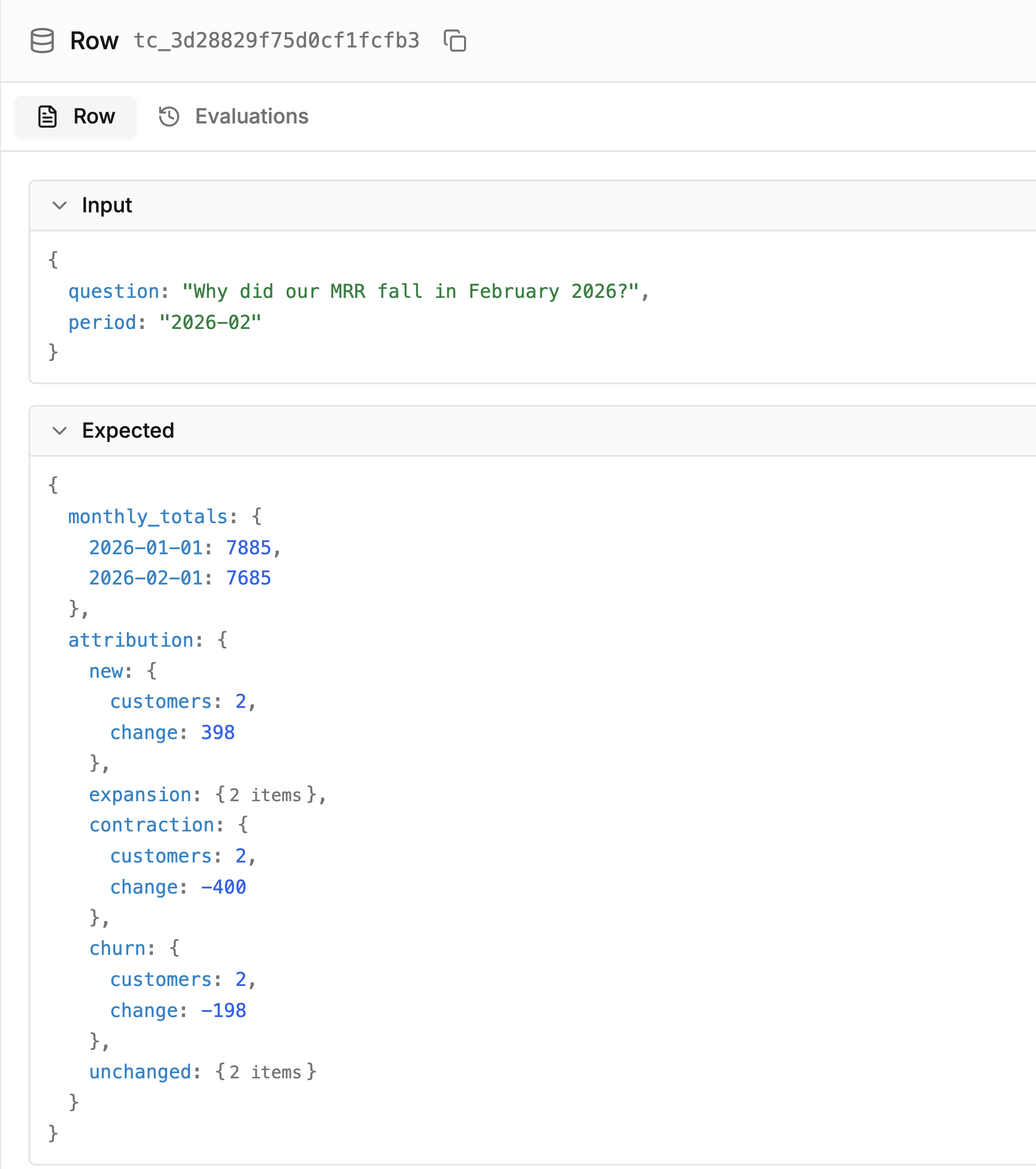
The saved case: the question and the expected movement breakdown.
When using Add to datasets, replace the prefilled Output with the verified expected result before saving. Saving the case creates an immutable dataset version for repeatable evaluation. We saved the expected breakdown as JSON text and parsed it before scoring.
We also froze the underlying database snapshot so future runs evaluate against the same data. By recording each run's trace ID, executed SQL, returned rows, final answer, and database hash, our checks can evaluate the structured evidence the agent used rather than parsing text out of its prose.
What an eval is made of
An eval runs your agent against saved cases and scores the results across three components:
- Dataset: A collection of test cases, each with an input and expected output.
- Task: The code that transforms an input into an output, typically your agent.
- Scorers: Functions, either plain Python assertions or judge models, that score each result against a metric. See the Scorers documentation.
TraceRoot reports results per metric without combining them into a single headline score. That separation matters: if a fix improves revenue attribution but breaks a monthly total, a single blended score would mask the regression.
For this tutorial, our task does not invoke the live LLM. Instead, it loads the recorded outputs of our two cloud runs from part 3 so the eval scores what happened. All four scorers are written in plain code. This checks one recorded case; testing future responses requires rerunning the agent over the saved suite.
Run it
We executed the four scorers through the SDK's evaluate() function for each recorded run. With project credentials configured and dataset loaded from the saved version, the evaluation call is:
from traceroot import evaluate

result = evaluate(
    name="February MRR recorded-output evaluation",
    dataset=dataset,
    task=load_recorded_output,
    scorers=[
        query_execution_succeeded,
        monthly_totals_match,
        attribution_matches,
        customer_lifecycle_consistent,
    ],
    candidate_version="recorded-cloud-v1-fixed",
    evaluation_key="langgraph-mrr-recorded-attribution",
)
Both runs use the same evaluation_key; candidate_version identifies the faulty and corrected candidates. You can inspect the runs in TraceRoot or from the terminal with traceroot evals runs list.

Blue is the faulty baseline; purple is the corrected run. The scorers check the data backing the answers rather than grading the prose.
| Check | Faulty run | Corrected run |
|---|---|---|
| Query execution | Pass | Pass |
| Monthly totals | Pass | Pass |
| Revenue attribution | Fail | Pass |
| Customer lifecycle | Fail | Pass |
Closing the loop: online and offline
This is where the agent observability loop completes:
- Online evaluation: Detectors monitor live production traffic to flag silent failures as they occur.
- Debugging: Root Cause Analysis inspects the trace and code commit to explain why the failure happened.
- Offline evaluation: Evals and Datasets check a proposed fix against saved cases before it ships.
Once a fix ships, detectors continue running on incoming production traces, and each newly confirmed failure feeds back into your dataset as a regression test case.
Takeaway
- Do not rely on a single passing rerun after applying a fix; agent non-determinism requires systematic regression testing.
- Save confirmed production failures as dataset test cases with verified expected outcomes.
- Score each metric independently so that an improvement in one area cannot hide a regression in another.
- Keep detectors running live to catch novel failures, feeding each verified case back into your offline eval suite.
The whole loop
That completes our four-step guide: Trace what ran, Detect what looks wrong, Debug why it broke, and Evaluate the fix before shipping. Most teams start with one step and layer on the rest as the workflow proves its value. If you are building from scratch, begin with the tracing post.
In this series, From trace to fix:
- Tracing a silent failure in a LangGraph SQL agent
- Catching a wrong revenue explanation with Detectors
- Fixing the reporting query behind the agent's answer
- Testing a LangGraph SQL agent fix with a regression eval (this post)
TraceRoot is open source. The quickstart gets tracing onto your own agent in a few minutes, the repository has the self-hosted version, and Discord is where the team answers questions.
Tell us what your first saved case was, or where this loop does not fit how your team works, on GitHub or Discord.
Further reading
- Evaluations, datasets, scorers and reading results in the TraceRoot docs
- Catching agent failures with Detectors and Signals
- Fixing the reporting query behind the agent's answer, part 3 of this series