Tracing a Silent Failure in a LangGraph SQL Agent
A LangGraph text-to-SQL agent explained a $200 MRR drop with the wrong reason. We trace the answer back to the reporting view it read in TraceRoot and show what to record.
 Xinwei HePublished
 An agent in production does not fail like ordinary software. The same input can give a different answer tomorrow, and a run can finish with every step green while the user gets a wrong answer.
We pointed a LangGraph SQL agent at a sample SaaS subscription dataset and asked why monthly recurring revenue, MRR, fell in February 2026. MRR had gone from $7,885 to $7,685, a drop of $200. The agent came back with a tidy story: four customers churned, four new ones signed up, and the new ones were on cheaper plans.
The $200 was right. Most of it came from two existing customers who had moved from a $299 plan to a $99 plan, and the agent never mentioned them. Anyone acting on that answer would have gone looking in the wrong place.
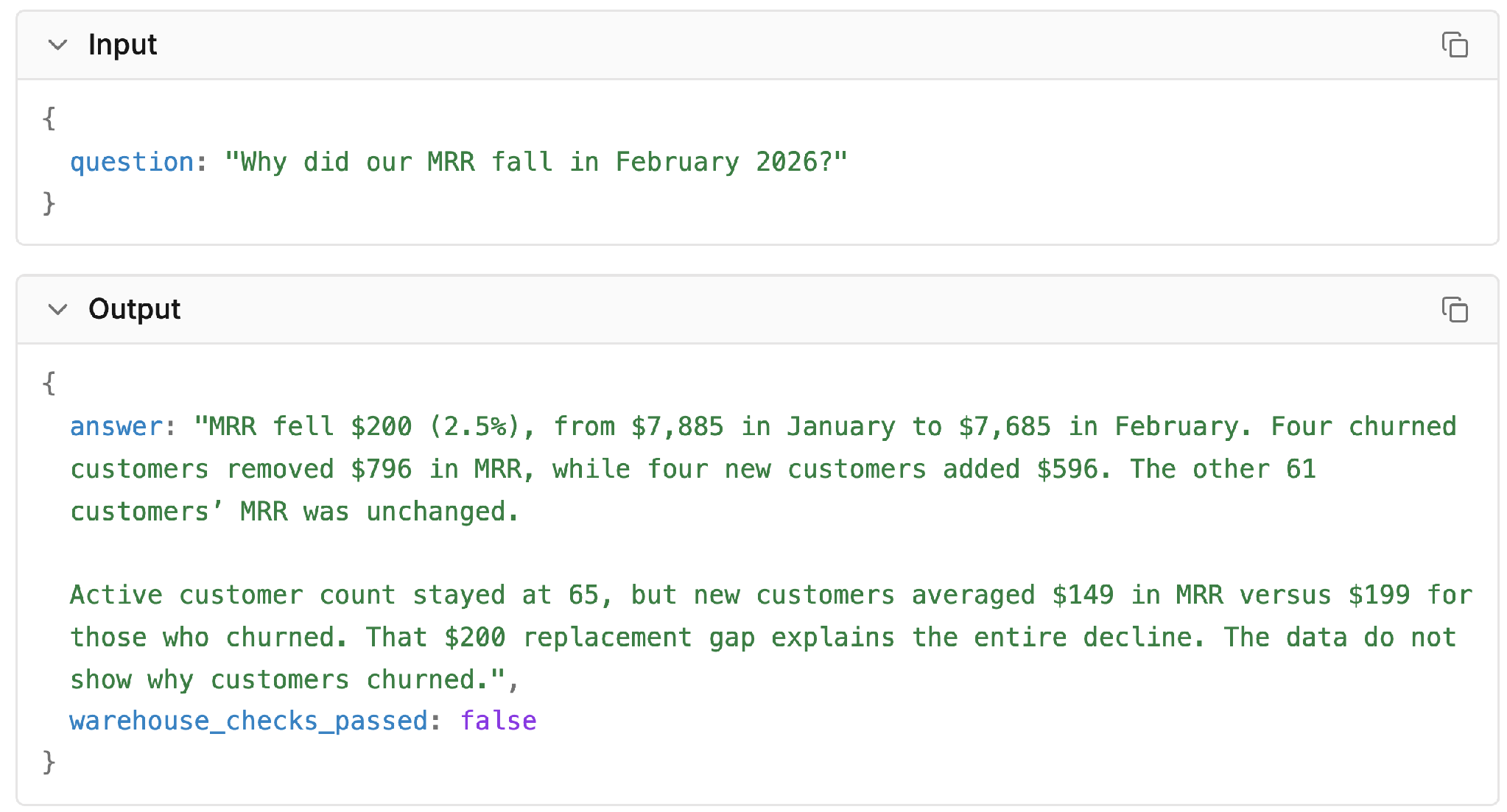
The question and the agent's answer.
Nothing about the run suggested a problem. The query ran, the categories added up to the right total, and the answer read like something an analyst would write.
Most teams respond by adding tracing, which is the right start. What comes after is slower: someone opens traces after a complaint, reads them one by one, finds the code or data behind the problem, and hopes the fix is safe. That reading is where the time goes, and it rarely has a process around it.
This series gives it one, in four steps, following this same MRR run from start to finish:
-
Trace: what ran. Inspect the queries and data the agent actually used to see how the wrong answer was produced. (This post)
-
Detect: what looks wrong. Use Detectors and Signals to catch runs that finish green with a flawed explanation.
-
Debug: why it broke. Trace the flagged run back to the underlying reporting view and fix the query logic.
-
Evaluate: is the fix safe. Compare runs before and after the change with a regression eval.
When the fix ships, new traces arrive and the loop starts again. Every step after this one reads from traces, so that is where we start.
Follow the answer back to the query
LangGraph runs the agent's tool loop. The model looks at the schemas on offer, writes a query, reads the rows that come back, and decides whether to query again or answer. The tools are the same three as in LangGraph's SQL agent tutorial: list the tables, fetch a schema, and run a query. In our setup, the agent only sees two aggregate views: monthly totals (mrr_totals) and revenue changes by category (mrr_changes). Customer-level subscription records stay out of its reach.
A TraceRoot trace records one complete run from the incoming request to the final answer, capturing each instrumented model call, tool call, and function along the way as a nested span. Reading down the span tree shows what happened, in what order, and inside which step:
-
The model spans (
codex.decidein this demo) hold the prompts, completions, model name, latency, and token cost. -
The SQL tool spans (
sql_db.list_tables,sql_db.schema, andsql_db.query) hold the tool arguments and what they returned.
In this run, the agent inspected both views, ran one query, and answered. Every span is green. There is no error, no timeout, and nothing slow. Opening sql_db.query shows the exact query the agent ran and the rows it used to write its reply.
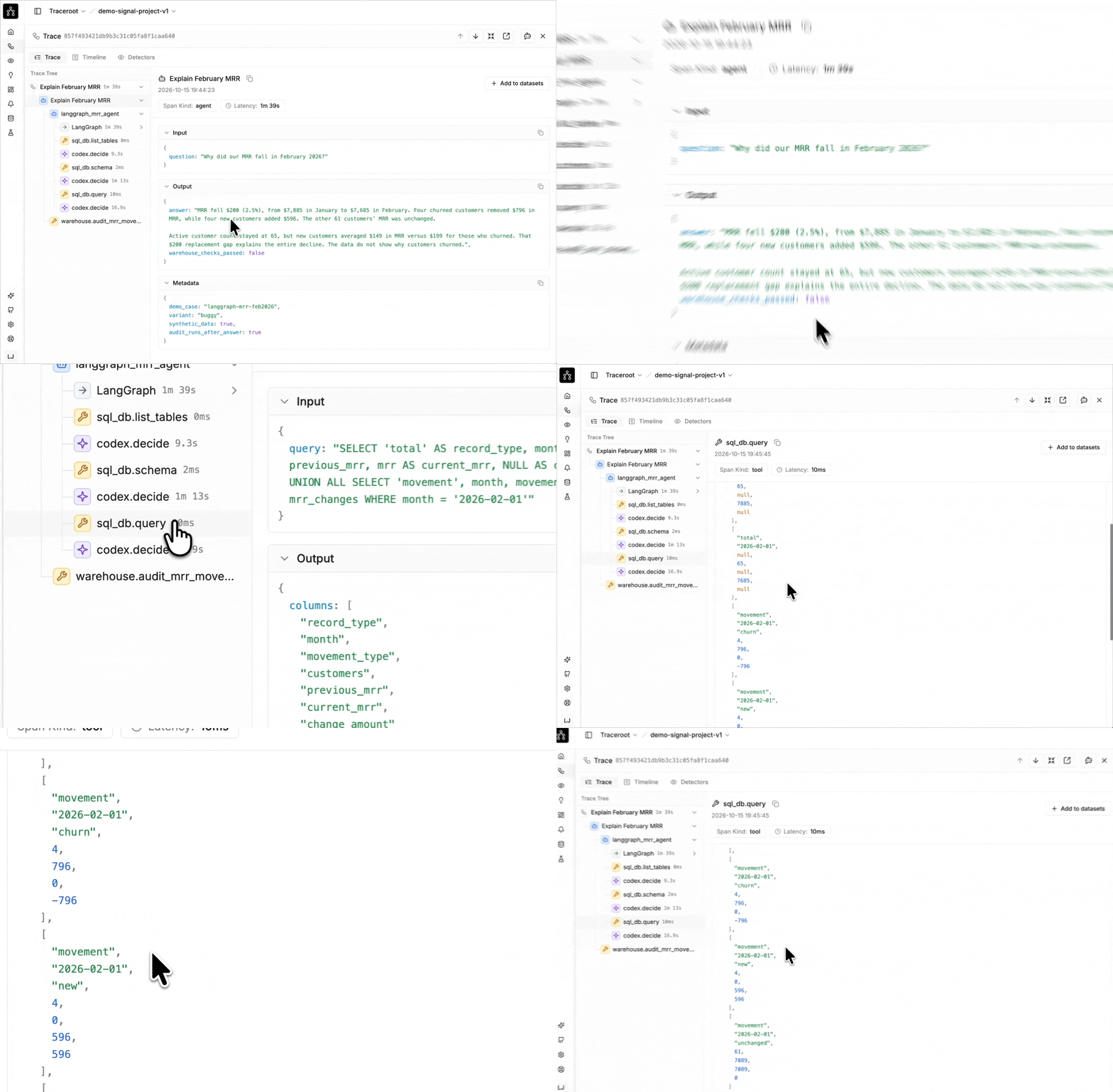
Opening the SQL tool span to see the query and its result.
The query reads mrr_totals and mrr_changes. It returns $7,885 of MRR for January and $7,685 for February, and this breakdown of the change:
| Reported movement | Customers | MRR change |
|---|---|---|
| Churn | 4 | −$796 |
| New | 4 | +$596 |
| Unchanged | 61 | $0 |
It adds up. The changes sum to −$200, and the customer count reconciles too: four out, four in, leaving 65 active customers in both months.
The agent's answer follows those rows directly. $596 across four new customers is $149 each, against $199 each for the four who churned, and four times that $50 gap is the $200. The trace shows that the model did not invent numbers; it summarized the report it was given.
Check the records behind the categories
The trace explains why the agent wrote that answer, not whether the underlying report was right. To check the report itself, we went to the subscription history for January and February, which the agent cannot see. Two accounts show up in both months on a cheaper plan:
| Customer | January plan and MRR | February plan and MRR | Change |
|---|---|---|---|
| CUST_0008 | Enterprise, $299 | Pro, $99 | −$200 |
| CUST_0029 | Enterprise, $299 | Pro, $99 | −$200 |
These are downgrades. The customer stayed and paid less, which the report should file under contraction.
A join bug we put into the reporting view counted each downgraded account as one churned customer (−$299) and one new customer (+$99). Subtract $299, add $99, and you still get −$200, so the monthly total never gave the mistake away.
Counted properly, two new customers added $398, two churned customers took $198, and the two downgrades took $400. The downgrades are the story of the month, and the reporting view had filed them under two other headings.
What to record
A trace records what ran. Whether the answer was right is a separate question. The MRR run is green from top to bottom, and its query output is consistent with itself: the categories add up to the right total. The mistake only shows up against the customer records, which the agent never saw.
This decides what is worth recording in your traces:
-
Inputs and outputs for every step that shapes the answer. Timing and status codes alone would have told us nothing here. To follow the answer back to its source, the trace needed the question, the reporting definitions, the SQL that ran, the rows that came back, and the final reply.
-
Session and metadata context. Multi-turn runs can be grouped into sessions, such as the turns of one conversation, and filtered by user, tag, and metadata when you need to isolate a specific workflow.
The recorded demo also includes a separate warehouse.audit_mrr_movements span that checks the customer history after the agent answers. Its evidence never enters the agent’s prompt; warehouse_checks_passed: false records the failed check, even though the spans completed without execution errors. The next post uses this evidence in a Detector.
How do you set up tracing?
1. Instrument one important path
Start with the request path that matters most, and trace it end to end before covering everything else. Install the SDK, set your API key and host URL as environment variables, and initialize it. For OpenAI calls in Python, enable the OpenAI integration:
# 1. pip install traceroot
import traceroot
from traceroot import Integration

traceroot.initialize(integrations=[Integration.OPENAI])
For TypeScript, install the TypeScript SDK, @traceroot-ai/traceroot. Frameworks such as LangGraph, the Vercel AI SDK, and the Claude Agent SDK have their own integration pages in the docs. If you work in Claude Code, traceroot instrument --agent claude --print from the TraceRoot CLI prints a setup prompt you can give your coding agent.
2. Find your first trace
Run the agent once, then find the run from your terminal:
# 2. Install the CLI and log in once
npm install -g traceroot-cli
traceroot login
traceroot projects list
export TRACEROOT_PROJECT_ID=<id>

# 3. Your recent runs, then one run's span tree
traceroot traces list --since 1h
traceroot traces get <trace-id>
traces get prints the span tree with each step’s duration and available token and cost data. Add --json --fields full when you also want the prompts, tool arguments, and completions.
3. Read a few traces by hand
Open five or ten real traces and read them from start to finish. Check that every step you care about is there, and that each span's input and output make sense. If a step is missing, add it now, because anything outside the trace is invisible to every later step.
Do this once, by hand. It stops working past a few dozen traces a day, and that is where the next post picks up.
Takeaway
-
Pick the request path that matters most and trace it end to end.
-
Run it once and find the trace with
traceroot traces listandtraces get. -
Read a handful of traces by hand and fill in the steps that are missing.
-
Record the inputs and outputs you would need to judge an answer. Timing and status are not enough.
Next: Detect
The next post covers how to find runs like the one above, the ones that went wrong without anyone noticing, without reading every trace yourself. If you want the mechanics first, Catching agent failures with Detectors and Signals walks through a Detector on a different case.
In this series, From trace to fix:
-
Tracing a Silent Failure in a LangGraph SQL Agent (this post)
TraceRoot is open source. The quickstart gets tracing onto your own agent in a few minutes, the repository has the self-hosted version, and Discord is where the team answers questions.
Tell us how you trace your agent, or where this guide did not fit your setup, on GitHub or Discord.
Further reading
-
Build a custom SQL agent, the LangGraph tutorial
-
SaaS subscription analytics pipeline, the dataset and generator (MIT)