

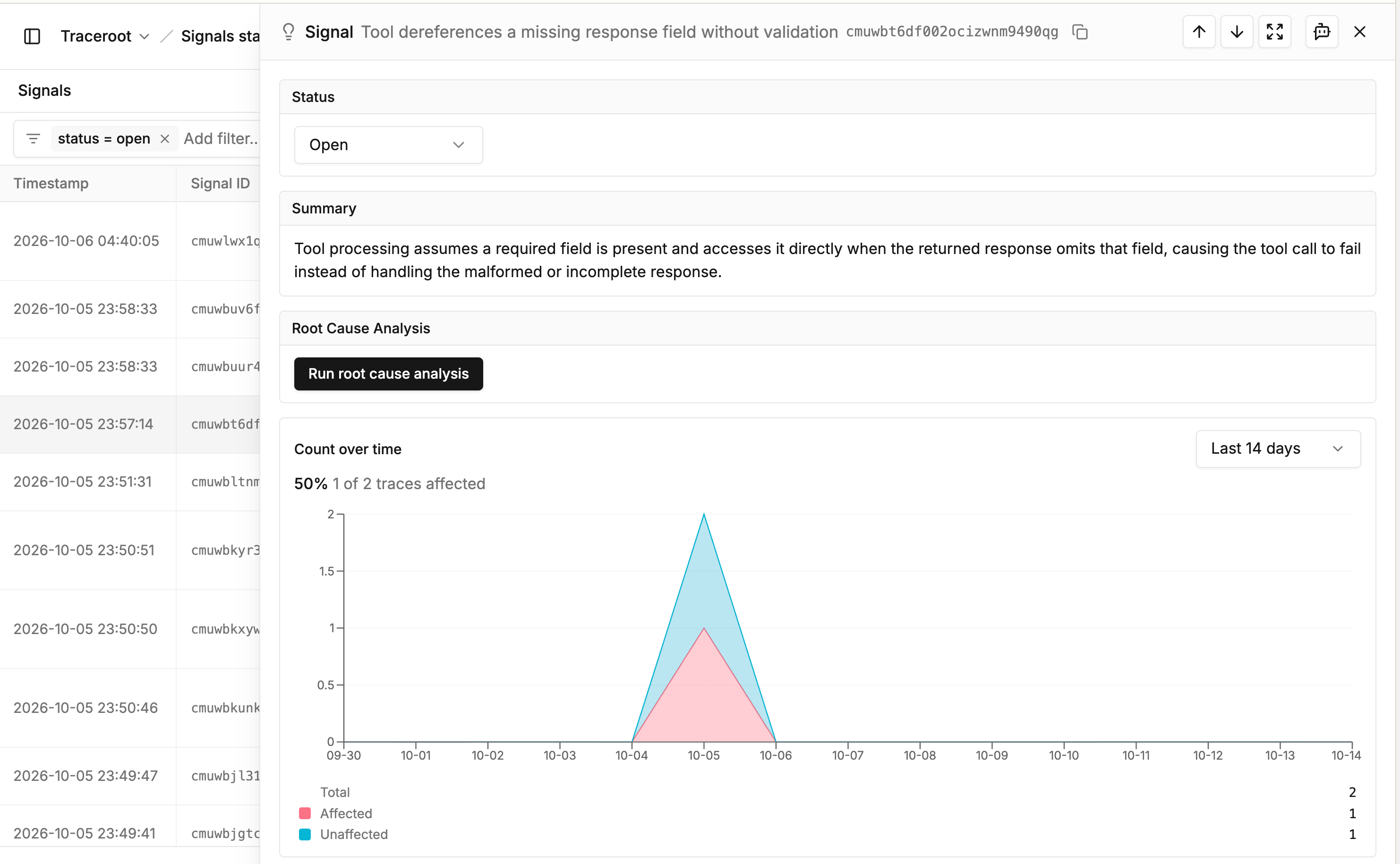
Signals page: the signal list, then one signal's status, summary and analysis
How findings become signals
When a detector flags a trace, TraceRoot records a finding. Within about a minute, TraceRoot adds the finding to the detector’s matching signal, or starts a new signal with a name and a Summary. A detector on a TypeSafe AI model groups its findings by the category the model picked. To stop grouping for a detector, turn off Generate signals in the Signals section of its settings. The detector still records findings, but TraceRoot does not group, analyze or announce them.Review signals
Open your project in TraceRoot Cloud and select Signals from the left nav. The list shows the newest signals first, filtered to Open. You can filter by status, by signal name or ID, or by detector name or ID. On the Detectors page, a detector’s Signals count opens this list filtered to that detector. That count, and the list it opens, cover signals in every status. The date range (Last 7 days by default) sets the period for each signal’s count of affected traces. It changes only the trace counts, and the chart and trace list in a signal’s panel. It never hides a signal. Select a signal to open its panel:- Status: the signal’s state, and the control to change it.
- Summary: what the signal covers.
- Root Cause Analysis: the latest analysis, or a Run root cause analysis button. When an analysis is shown, Open in agent opens it in the TraceRoot Agent for follow-up questions.
- Count over time: of the traces the detector checked, how many this signal affected (Affected) and how many it did not (Unaffected), over the date range.
- Affected traces: up to 10 recent traces from the date range. View all opens them on the Tracing page, filtered to the signal.
Signal states
A signal is Open, Resolved or Dismissed. Change it with the Status control on its panel.- Open: the problem needs attention. Every new signal starts here.
- Resolved: the problem is fixed. Pick a reason, such as PR was merged.
- Dismissed: the signal needs no action. Pick a reason, such as Expected behavior.
- A resolved signal reopens by itself when a finding arrives from a trace that started after you resolved it. The next notification lists it as Reopened.
- A dismissed signal stays dismissed.
- Setting a signal back to Open by hand sends no notification and starts no analysis.
Root cause analysis
The TraceRoot Agent reads one of the signal’s traces and explains the cause. With GitHub connected, it also reads the related code and recent commits. The detector’s Root cause analysis setting decides when it runs:- Automatic: on each new signal, and on a reopened signal when the last analysis is more than 24 hours old.
- Manual: only when you click Run root cause analysis on the signal’s panel.
Next steps
Detectors
Set up the checks that flag problem traces.
Detector Notifications
Email and Slack digests for new and reopened signals.