traceroot vs. Braintrust
Compare traceroot and Braintrust: open source and self-hosting, GitHub context on every trace, Signals vs. Patterns, root cause analysis and pricing.
 Xinwei HePublished 13 min read
On this page
Your agent gave a wrong answer in production, and every span in the trace is green. Both traceroot and Braintrust will show you that trace. This post compares what each one does next, and who gets to run the platform that does it.
TL;DR
Open source and self-hostable. traceroot is open source, and you can run the whole platform yourself, from the UI to the root cause analysis agent. Braintrust's platform is closed source. Its SDKs, autoevals library, proxy and CLI are public, and its option for your own cloud is BYOC on the Enterprise plan, with the control plane still hosted by Braintrust.
Built for coding agents. traceroot ships a CLI made for AI coding agents. A guided setup can connect a project, help your coding agent instrument the service and check for the first trace. Later the same agent can pull a failure and its root cause analysis into the repository it is editing. It can also read, write, edit and delete most of what you see in the UI.
Full GitHub context on every trace. traceroot attaches the repository and Git ref to production traces, and records the file, line and function for instrumented functions. Braintrust attaches Git metadata to experiments, not to production logs.
From Signals to pull request. LLM judge outputs cluster agent errors into Signals that reopen on regression. A root cause analysis agent reads your code at the recorded commit, and can optionally create a GitHub pull request with a fix verified by an offline eval, for an engineer to review.
Full BYOK. Detectors and the agent can run on your own key from 11 model providers, including Anthropic, Google Gemini and AWS Bedrock, on every plan.
Choose traceroot if you want a more agent-native product on an open-source stack you control: full BYOK, easy to self-host and extensible. It is easier to use with a coding agent, and it has more AI features that automate agent improvement, from a Signal to a root cause to a reviewed fix.
Choose Braintrust if your team works eval-first and wants a workbench for experiments on a closed, fully managed platform.
At a glance
| Braintrust | traceroot | |
|---|---|---|
| Open-source platform | — SDKs, autoevals, proxy and CLI | ✓ |
| Self-hosting | Enterprise only, BYOC | ✓ |
| Control plane in your environment | — | ✓ |
| Step-by-step agent tracing | ✓ | ✓ |
| OpenTelemetry ingestion | ✓ | ✓ |
| Python and TypeScript SDKs | ✓ | ✓ |
| Framework integrations | ✓ | ✓ |
| CLI | ✓ | ✓ |
| Cost and token tracking | ✓ | ✓ |
| Dashboards and Slack alerts | ✓ | ✓ |
| Datasets and experiments | ✓ | ✓ |
| LLM judge on production traces | ✓ | ✓ |
| Built-in agent | ✓ | ✓ |
| Repository and commit on production traces | Experiments only | ✓ SDK Git context |
| Recurring failures tracked with a status | ✓ | ✓ |
| Reads your code at the traced commit | Default branch, by default | ✓ |
| Opens a pull request | ✓ | ✓ |
| Your own model key | ✓ OpenAI-compatible providers only | ✓ Full BYOK, 11 providers |
| Paid plans from | $249 a month | $30 a month |
Open source and self-hosting
Traces hold your prompts, your customers' own words, the answers your agent gave and every internal tool it touched. traceroot is built so that record can stay with you.
traceroot is open source, and self-hosting is self-serve. One Docker Compose command brings up the whole stack in your environment, from the UI and API to the databases and the root cause analysis agent. Because the code is open, you can read exactly what it stores, and extend it when you need something it does not do yet.
Braintrust publishes its SDKs, the autoevals library, its proxy and its CLI. The platform itself is closed source. Starter and Pro are SaaS only. The option for your own cloud is BYOC on the Enterprise plan, where Braintrust operates a data plane inside your cloud account. The control plane, which serves the UI and handles sign-in, stays on Braintrust's cloud.
| Dimension | Braintrust | traceroot |
|---|---|---|
| Platform source code | Closed | Open source |
| Self-serve self-hosting | — | Docker Compose, from the public repository |
| Who can self-host | Enterprise customers, through BYOC | Anyone, from the public repository |
| Who runs the deployment | Braintrust operates the data plane in your cloud | You |
| Control plane | Hosted by Braintrust | Runs in your environment |
Tracing and git context
Both tools trace an agent step by step, and both ingest OpenTelemetry, so you can send the same traces to both. traceroot adds full GitHub context to each trace. The SDK captures the repository and Git ref, and records the source file, line and function name for instrumented functions. The ref resolves from explicit settings first, then environment variables, then GitHub Actions variables, and then local Git information. For production images without a .git directory, the repository and commit can be injected at build time.
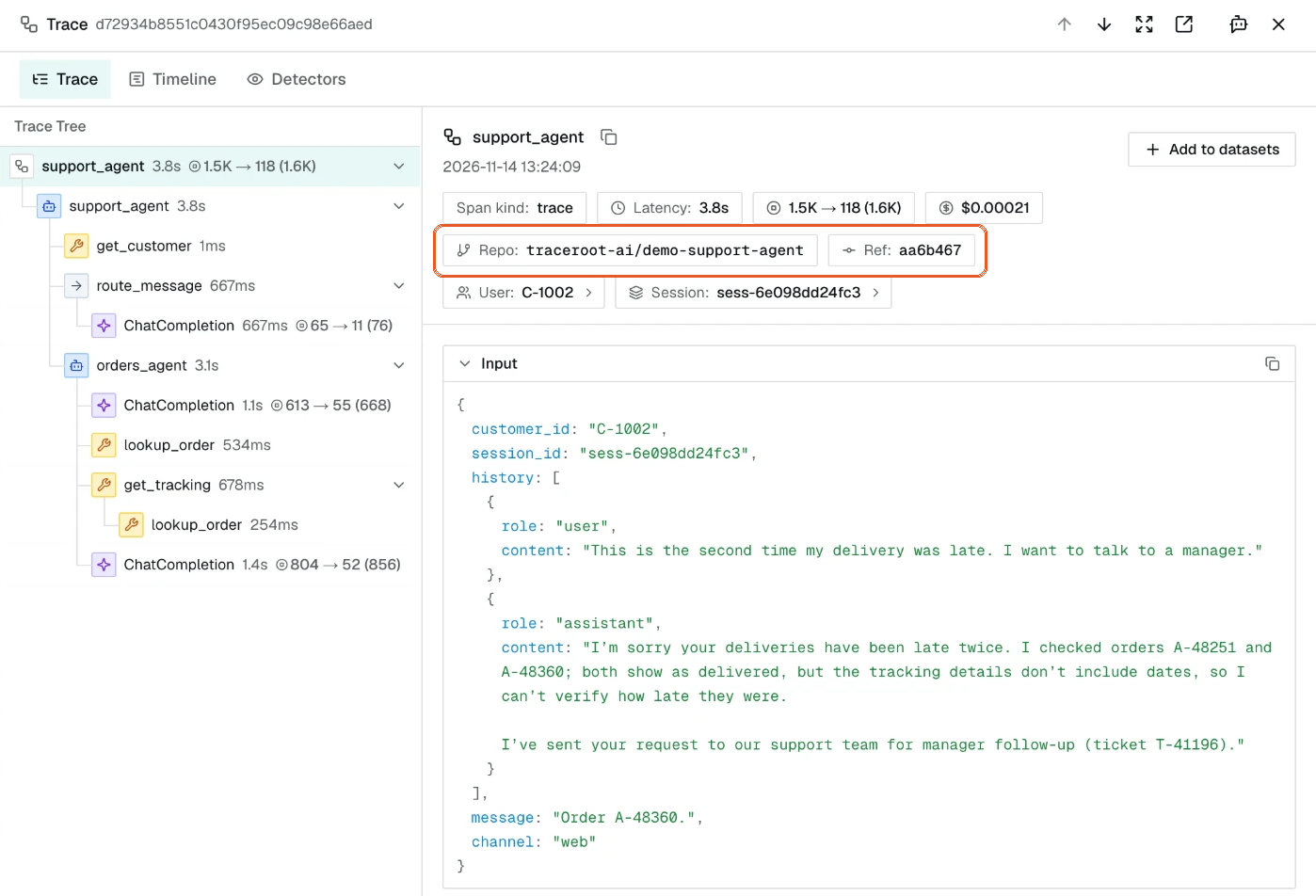
The Repo and Ref badges show the commit that ran.
That metadata is what makes the rest of the loop possible. With a commit SHA on the trace, the root cause analysis agent inspects the revision that ran, not whatever is on the default branch today.
Braintrust can record Git metadata such as the commit and branch on experiments. Production logs do not carry the commit unless you add it as metadata yourself.
| Dimension | Braintrust | traceroot |
|---|---|---|
| Repository and Git ref on production traces | On experiments; via metadata for logs | Captured by the SDK when available or configured |
| File, line and function for instrumented functions | Caller fields on spans | Recorded on each instrumented function, with Show Code in the trace view |
| OpenTelemetry-based instrumentation | OTLP ingestion | Yes |
| Trace export with git context | Traces through bt view and bt sync |
Export includes the trace, spans and Git context |
Signals and Loop
traceroot is purpose-built for one job: helping you keep improving your agents in production. A detector is a plain-language description of one behavior you want to catch, such as a failure, a hallucination, a logic error or an unfinished task, that a judge model checks production traces against. It checks each eligible trace about a minute after its last span arrives, so every sampled trace gets its own verdict.
When a detector says yes, it flags the trace, and related flagged traces are grouped into one Signal. A Signal is Open, Resolved or Dismissed, and a Resolved Signal reopens by itself when a newer trace shows the problem again. Because a detector judges every sampled trace against a description you wrote, each Signal is specific about what went wrong.
The same Signal starts root cause analysis and, later, a fix. The investigation runs a coding agent in a sandbox with your traces and your repository at the recorded commit, which is what makes its improvement suggestions concrete. That is how a Signal turns into an improvement to your agent. Detectors and root cause analysis already run without anyone triggering them, and scheduled runs of the traceroot agent, for recurring work such as a regular summary of your traces, are coming soon.
Braintrust approaches this through Loop, a general agent that works over your logs. Patterns, the one aimed at recurring failures, runs as a Loop automation that reads a sample of traces on a schedule.
| Dimension | Braintrust | traceroot |
|---|---|---|
| How recurring failures are found | Loop reads a sample of traces on a schedule and saves Patterns | Detectors judge each sampled trace; flagged traces are clustered into Signals |
| Status of a problem | Open or Closed | Open, Resolved with a reason, Dismissed |
| Reopen on regression | Manual, by setting the status back to Open | Automatic, when a newer trace shows the problem |
Root cause analysis and pull requests
With Signals and automatic root cause analysis enabled, a new or reopened Signal starts an investigation. You can also run one manually.
The quality of a root cause depends on the context the agent has. traceroot's agent is a coding agent, powered by pi-mono, that runs in an isolated sandbox. It works with the traces behind the Signal, a clone of your GitHub repository at the commit recorded on the trace, and the file and line recorded on the failing span. With that full context, it returns a high-quality root cause, the code location and a recommended fix.
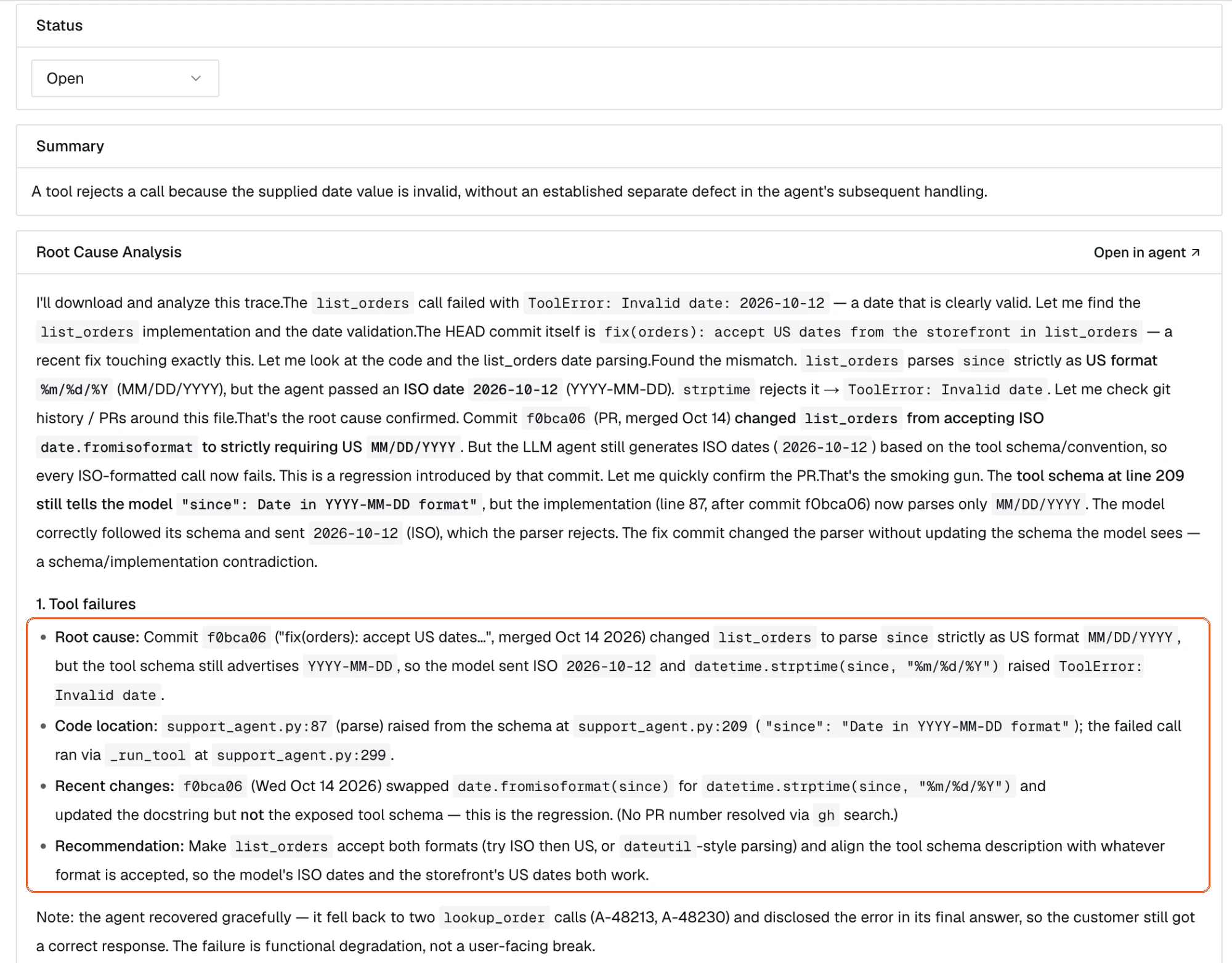
The outlined block names the commit, file and fix.
A pull request is optional. If you ask for one, the agent writes the fix and opens a pull request on a new branch, linked to the trace, for an engineer to review. It never pushes to main.
Loop can also connect to GitHub. It reads the default branch unless you point it at a specific commit, and production logs do not record which commit ran.
| Dimension | Braintrust | traceroot |
|---|---|---|
| Code that is read | Default branch, by default | A sandbox clone at the commit recorded on the trace |
| Pull requests | On Braintrust-hosted deployments | Optional, opened through the GitHub App on a new branch, linked to the trace |
A CLI your coding agent can use
The traceroot CLI is built around setup and the improvement loop, for AI coding agents as much as for people.
traceroot setup guides you through connecting a project, helping your coding agent instrument the service and checking for the first trace. traceroot instrument hands your agent a ready-made prompt for Claude, Codex or any other agent, and traceroot doctor checks your credentials, repository, environment and skills.
After that, an agent can list flagged traces, read one together with its root cause analysis, and export a trace with its git context into the repository it is working in. It can also run project-scoped, read-only SQL over spans and traces, and create, update and delete detectors, alerts, dashboards and projects. The CLI supports JSON output and documented exit codes.
| Dimension | Braintrust | traceroot |
|---|---|---|
| Guided setup | Setup wizard script from braintrust.dev/wizard/setup.sh |
npx -y traceroot-cli@latest setup, with setup --resume to continue a run that stopped |
| Agent-ready instrumentation | bt setup instrument --agent <agent> (deprecated in favor of the wizard) |
traceroot instrument --agent <agent> |
| Health check | bt setup doctor (deprecated), bt status |
traceroot doctor and traceroot setup doctor |
| Flagged traces with root cause analysis | — | traceroot findings list and traceroot findings get |
| Trace export | bt view trace, bt sync |
traceroot traces export, which also writes git_context.json |
| Read-only SQL | bt sql, without joins, subqueries, unions or window functions |
traceroot sql, with joins, subqueries, CTEs and UNION |
Evaluation as the verify step
A fix is only done when it is checked. traceroot evaluations run your system over a dataset, and each case runs as a trace, so the cost and span views you use in production are there for the eval too. Scorers can be code or an LLM judge. Label a run with the pull request's commit, compare it with the current version on the same immutable dataset version, and merge when it holds.
Pricing and retention
traceroot is priced by events, where a trace and each of its spans count as one event. Braintrust meters processed data in GB and scores, and data past the retention window is no longer available in its UI, SQL or API.
| Dimension | Braintrust | traceroot |
|---|---|---|
| First paid plan | Pro, $249 a month | Starter, $30 a month |
| Next plan | Enterprise, custom | Pro, $200 a month |
| What is metered | Processed GB and scores | Events |
| Retention on the free plan | 14 days | 15 days |
| Retention on Pro | 30 days, more at extra cost | 90 days |
| Self-hosting | Enterprise only | ✓ |
Which should you choose
Choose traceroot if you want a more agent-native product on an open-source stack you control. It is easier to use with a coding agent, and it has more AI features that automate agent improvement. Agent errors are clustered into Signals with full GitHub context, analysed against your repository at the recorded commit and, optionally, turned into a reviewed pull request, with a CLI your coding agent can drive.
Choose Braintrust if your team works eval-first and wants a workbench for experiments on a closed, fully managed platform.
Both ingest OpenTelemetry, so the easiest way to decide is to send one agent's traces to traceroot next to what you have.
Switching from Braintrust
You do not have to switch in one step. Both products ingest OpenTelemetry, so the same instrumentation can send traces to traceroot and Braintrust at the same time.
- Run
npx -y traceroot-cli@latest setupin the repository of one agent. Keep sending that agent's traces to Braintrust. - Write a detector for one failure you already know about, and connect the GitHub App so root cause analysis can read your code at the recorded commit.
- Compare what each tool tells you about the same failures for a week or two.
- Move your evaluations when you are ready. traceroot evaluations run from the Python and TypeScript SDKs, and your datasets and experiments can stay in Braintrust until then.
Get started
Install the CLI and run traceroot setup in the repository of one agent. Pick one failure you have already worked through by hand, so you know what a correct diagnosis looks like, then write a detector that describes it in plain language and connect the GitHub App.
FAQ
Is traceroot an open-source Braintrust alternative? Yes. traceroot is open source and self-hostable. It clusters LLM judge outputs into Signals, investigates them using your traces and your repository at the recorded commit, and can optionally open a pull request for review.
Is Braintrust open source? Its SDKs, the autoevals library, the proxy and the CLI are. The platform itself is not.
Can I self-host Braintrust? Only on the Enterprise plan, through BYOC, with the control plane hosted by Braintrust. traceroot can be self-hosted from its public repository.
Do I have to move everything from Braintrust? No. Start with one agent. Your experiments and datasets can stay where they are while you run the pilot.
Does it work with my coding agent? traceroot instrument and traceroot skills install support Claude and Codex, and a generic mode works with other agents.
Do I need to give traceroot access to my repository? Only for the code investigation and pull requests. Tracing works without it.
How does traceroot pricing compare to Braintrust? traceroot's paid plans start at $30 a month, and Braintrust Pro is $249 a month. traceroot meters events, where a trace and each of its spans count as one event. Braintrust meters processed data in GB and scores. On the Pro plan, traceroot keeps data for 90 days and Braintrust for 30 days, with longer retention at extra cost.
Does Braintrust record the commit on production traces? Not automatically. Braintrust can collect Git metadata for experiments, and for production logs you add the commit yourself as custom metadata. traceroot's SDK captures the repository and Git ref on production traces, and records the file, line and function for instrumented functions.
What is the difference between Signals and Braintrust Patterns? In traceroot, a detector judges each sampled trace, and flagged traces with the same problem are grouped into a Signal. A resolved Signal reopens by itself when a newer trace shows the problem again. Braintrust Patterns are found by Loop on a schedule, and a closed pattern is reopened manually.
All Braintrust facts were checked against its public documentation in November 2026.