traceroot vs. Arize Phoenix
An open-source Arize Phoenix alternative, compared at the source level: architecture, OpenInference tracing, git context, Signals, root cause analysis and pricing.
 Xinwei HePublished 18 min read
On this page
Your agent answered a customer wrong, and the trace looks fine. traceroot and Arize Phoenix are both open source, both run on OpenTelemetry, and both will show you that trace. Because you can read both codebases, this post compares them at the source level: what each one runs, what it stores, and what it does with a bad trace. Facts were checked against public Phoenix docs and the Phoenix repository at commit 5160fd5 in November 2026.
TL;DR
Same instrumentation underneath. traceroot's Python and TypeScript SDKs are built on the OpenInference instrumentors that Arize maintains, and its ingest worker reads OpenInference attributes. Spans from a framework look the same in both tools.
Full GitHub context on every trace. The traceroot SDK records the repository and Git ref on every span, and the file, line and function for instrumented functions. Phoenix's register() sets up OpenInference tracing and does not add repository or commit attributes.
Detectors judge production traces on the server. A traceroot detector judges each sampled trace about a minute after its last span arrives, and flagged traces with the same problem are grouped into Signals that reopen on regression. In Phoenix, you run evals on traces from your own code and log the results back; scheduled failure grouping (Signal) is part of Arize AX, not Phoenix.
Root cause analysis reads your code at the recorded commit. traceroot's agent clones your repository at the commit on the trace into a sandbox, and can optionally open a pull request for review. Phoenix's PXI agent works over your observability data and can file a GitHub issue.
PostgreSQL or ClickHouse underneath. Phoenix stores traces in SQLite or PostgreSQL, and its architecture page sends high-volume ingestion and OLAP workloads beyond what those databases are designed for to Arize AX, which runs on adb, Arize’s own OLAP database. traceroot keeps spans in ClickHouse, the columnar database Langfuse is also built on, in the same open-source code you self-host.
Choose traceroot if you want an open-source, self-hostable platform built to keep improving agents in production: from a judged trace to a Signal, to a root cause in your code, to an optional pull request, with a CLI your coding agent can drive. At 100 runs a day with every run judged, that is $30 a month on traceroot Starter against $50 on Arize AX Pro.
Choose Arize Phoenix if you want a free, self-hosted tool for tracing, evals, datasets and experiments that you run and scale on your own database, and you are happy to run production evals from your own code.
Choose Arize AX if you want Arize to run the platform for you, with Signal grouping production issues, monitors and alerting, and the adb datastore, and you do not need it to be open source.
At a glance
| Arize Phoenix | Arize AX | traceroot | |
|---|---|---|---|
| Open source | ✓ | — | ✓ |
| Self-hosting | ✓ Free | Enterprise only | ✓ |
| Span store | SQLite or PostgreSQL | adb, OLAP | ClickHouse |
| OpenInference tracing | ✓ | ✓ | ✓ Bundled in SDKs |
| CLI and skills for coding agents | ✓ | ✓ | ✓ |
| Built-in agent | ✓ PXI (beta) | ✓ Alyx | ✓ |
| Repository and Git ref on traces | Via attributes | Via attributes | ✓ SDK Git context |
| LLM judge on production traces | Via your code | ✓ Online evals | ✓ Detectors |
| Recurring failures grouped | Via the APIs | ✓ Signal | ✓ Signals |
| Monitors and alerts | — | ✓ | ✓ |
| Investigates in your codebase | — | Enterprise | ✓ At traced commit |
| Opens a pull request | GitHub issues only | Enterprise | ✓ Optional |
| Paid plans from | Free, self-hosted | $50 a month | $30 a month |
Open source and self-hosting
Traces hold your prompts, your customers' words and every tool call your agent made. Both projects let you keep that record on your own machines, and both publish the code that does it.
traceroot is open source and self-hostable. make prod in the repository brings up the full stack with Docker Compose: the web app, the API, the ingest worker, the detector worker, the root cause analysis agent and the databases (docker-compose.prod.yml). The SDKs and the CLI live in their own repositories (traceroot-py, traceroot-ts, traceroot-cli).
Phoenix is published by Arize under several licenses, one per package. The server in the repository root is under the Elastic License 2.0, which allows self-hosting and modification but not "provid[ing] the software to third parties as a hosted or managed service". Phoenix's docs describe self-hosting as having "no feature gates" (License).
| Phoenix package | Path | License |
|---|---|---|
Server and UI (arize-phoenix) |
src/phoenix |
Elastic License 2.0 |
Python evals (arize-phoenix-evals) |
packages/phoenix-evals |
Elastic License 2.0 |
Python OTel helper (arize-phoenix-otel) |
packages/phoenix-otel |
Apache 2.0 |
Python client (arize-phoenix-client) |
packages/phoenix-client |
Apache 2.0 |
| TypeScript evals and CLI | js/packages/phoenix-evals, js/packages/phoenix-cli |
Apache 2.0 |
| OpenInference instrumentors | Arize-ai/openinference | Apache 2.0 |
Phoenix itself is self-hosted. Arize's managed product is Arize AX, a separate commercial platform that accepts the same OpenInference data. traceroot is one product: the code you self-host is the code behind traceroot Cloud.
Architecture, from SDK to storage
The two platforms make different storage choices, and those choices shape everything above them.
traceroot buffers OTLP batches in object storage, a worker writes spans to ClickHouse, a detector worker judges finished traces, and flagged traces become Signals that the root cause analysis agent investigates. Phoenix receives OTLP in one Python server, whose in-process bulk inserter writes spans to SQLite or PostgreSQL.
traceroot is split into services. The public traces endpoint stores each OTLP request body in S3 or MinIO exactly as received, then queues a task with a pointer to it (traces.py). A Celery worker decodes the batch and writes it to ClickHouse (ingest_tasks.py). Because the raw body is stored first, a batch that fails every attempt is moved to a separate prefix where it can be inspected or replayed (ingest_quarantine.py).
Spans live in a ClickHouse ReplacingMergeTree table, partitioned by month and ordered by project, trace and start time (005_rebuild_spans_trace_id_order.sql). Input, output and metadata are compressed with ZSTD, and a projection without those payloads serves list and dashboard queries. The same table has first-class git_source_file, git_source_line and git_source_function columns. PostgreSQL holds the app's own records, and Redis carries the queues.
Phoenix is one Python application. The server is built on Starlette and FastAPI with a Strawberry GraphQL API and SQLAlchemy (pyproject.toml). One process serves the UI, the APIs and trace ingestion (config.py). Incoming spans go through an in-process bulk inserter (bulk_inserter.py) into a relational spans table, with attributes stored as JSON (models.py). The architecture page lists SQLite as the default and PostgreSQL for production, describes one instance as one tenant, and points high-volume OLAP workloads to Arize AX, which runs on adb, Arize’s own OLAP database.
| Dimension | Arize Phoenix | traceroot |
|---|---|---|
| Span store | SQLite or PostgreSQL | ClickHouse, columnar |
| Ingest path | In-process queue, then batched inserts | Durable S3 or MinIO buffer, then a worker |
| App records | Same database as spans | PostgreSQL |
| Background work | Daemons in the server process | Celery and BullMQ workers on Redis |
| Deployment files | Docker, Helm chart, Kustomize | Docker Compose |
| Retention | Per project, indefinite by default | Per-project trace TTL |
Tracing, OpenInference and git context
Both tools trace an agent step by step, and the instrumentation underneath is largely shared. traceroot's Python SDK depends on the OpenInference instrumentors for OpenAI, Anthropic, LangChain, LlamaIndex, CrewAI, the OpenAI Agents SDK, Google GenAI and more (pyproject.toml), and the TypeScript SDK uses the @arizeai/openinference-* packages (package.json). On the server, traceroot maps openinference.span.kind to its own span types (otel_transform.py). Credit where it is due: OpenInference is Arize's work, and it is the reason a LangChain span looks the same in both tools.
What traceroot adds on top is full GitHub context. When the client starts, it resolves the repository and Git ref from explicit settings first, then TRACEROOT_GIT_REPO and TRACEROOT_GIT_REF, then CI variables, then files written at build time, then the local .git directory (client.py). The span processor stamps traceroot.git.repo and traceroot.git.ref on every recording span (span_processor.py), and the observe decorator records the caller's file, line and function (git_context.py). For images without a .git directory, the repository and commit can be injected at build time.
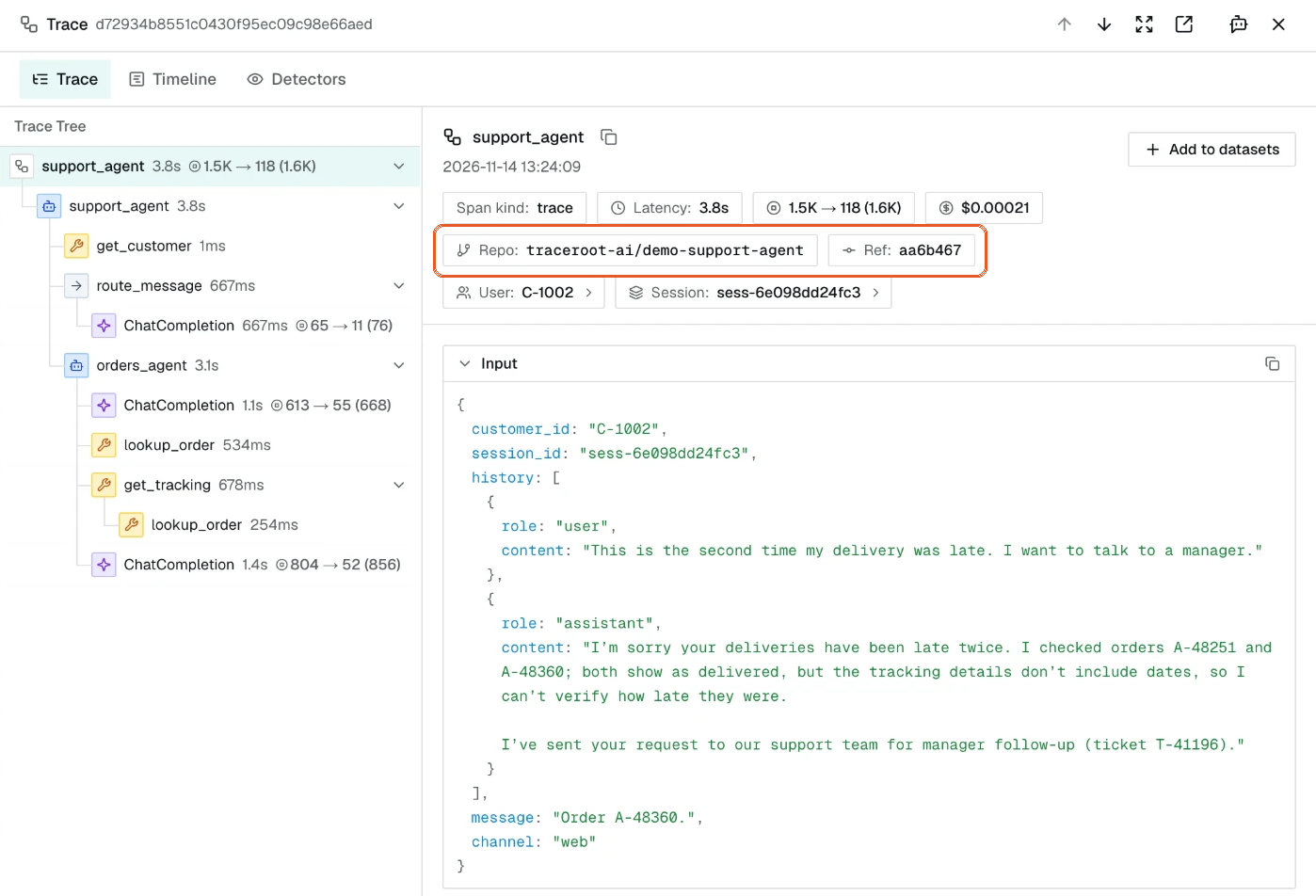
Phoenix's register() creates an OpenTelemetry tracer provider with Phoenix defaults: endpoint, project name, batching, headers and optional auto-instrumentation. It does not add repository or commit attributes, so on Phoenix you attach them yourself as span or resource attributes.
| Dimension | Arize Phoenix | traceroot |
|---|---|---|
| Instrumentors | OpenInference | OpenInference, inside the SDKs |
| Repository and Git ref | Your own attributes | Captured by the SDK on every span |
| File, line and function | — | Recorded on each instrumented function |
| Trace export with git context | Traces and spans through px |
Export includes spans and Git context |
Detectors, Signals and evals on traces
traceroot is built for one job: helping you keep improving your agents in production. A detector is a plain-language description of one behavior you want to catch, such as a wrong answer or an unfinished task, that a judge model checks traces against.
The trigger path is in the open-source backend. The ingest batch that carries a trace's root span takes a Redis lock, checks the detector's filters and a deterministic sample, and enqueues one delayed job. The worker then waits until the trace has been quiet for 60 seconds before judging it (detector_tasks.py). Every sampled trace gets its own verdict, once.
When a detector says yes, the trace is flagged and grouped into a Signal. For most detectors, traceroot embeds the judge's summary, shortlists the nearest existing Signals, and lets a model decide whether the trace joins one or starts a new one. A Signal is Open, Resolved or Dismissed, and a Resolved Signal reopens by itself when a trace that started after the fix shows the problem again.
In Phoenix, evaluating production traces is a client-side job. You export spans from Phoenix, run an LLM judge from the arize-phoenix-evals library in your own environment, and log the labels back as annotations (Running Evals on Traces). Server-side evaluators in Phoenix attach to datasets and run on experiments (Server Evals). For "evals on production traffic with alerting and threshold-based triggers", Phoenix's docs point to Arize AX (LLM Evals). Arize's Signal, "a built-in worker that scans your traces on a schedule and groups recurring failure patterns into issues", is also an Arize AX feature; Arize notes that with Phoenix "the same workflows are possible through the Phoenix APIs" on compute you run (Phoenix or AX).
| Dimension | Arize Phoenix | traceroot |
|---|---|---|
| Judge on production traces | Your code, with arize-phoenix-evals |
Server-side detectors |
| Sampling and filters | In your script | Per detector |
| Recurring failures | Via the APIs; Signal is AX only | Grouped into Signals, reopened on regression |
| Alerts | AX only | Email and Slack digests |
Root cause analysis and pull requests
With automatic root cause analysis on, a new or reopened Signal starts an investigation. You can also run one by hand.
A root cause is only as good as the context behind it. traceroot's agent is a coding agent, powered by pi-mono, that runs in an isolated sandbox. It clones your repository at the commit recorded on the trace, reads the traces behind the Signal and the file and line on the failing span, and returns a root cause, the code location and a recommended fix. The sandbox can read trace data and source code, but not your production databases or APIs. In docker-compose.prod.yml, the agent is its own service, with Docker or Daytona as the sandbox provider.
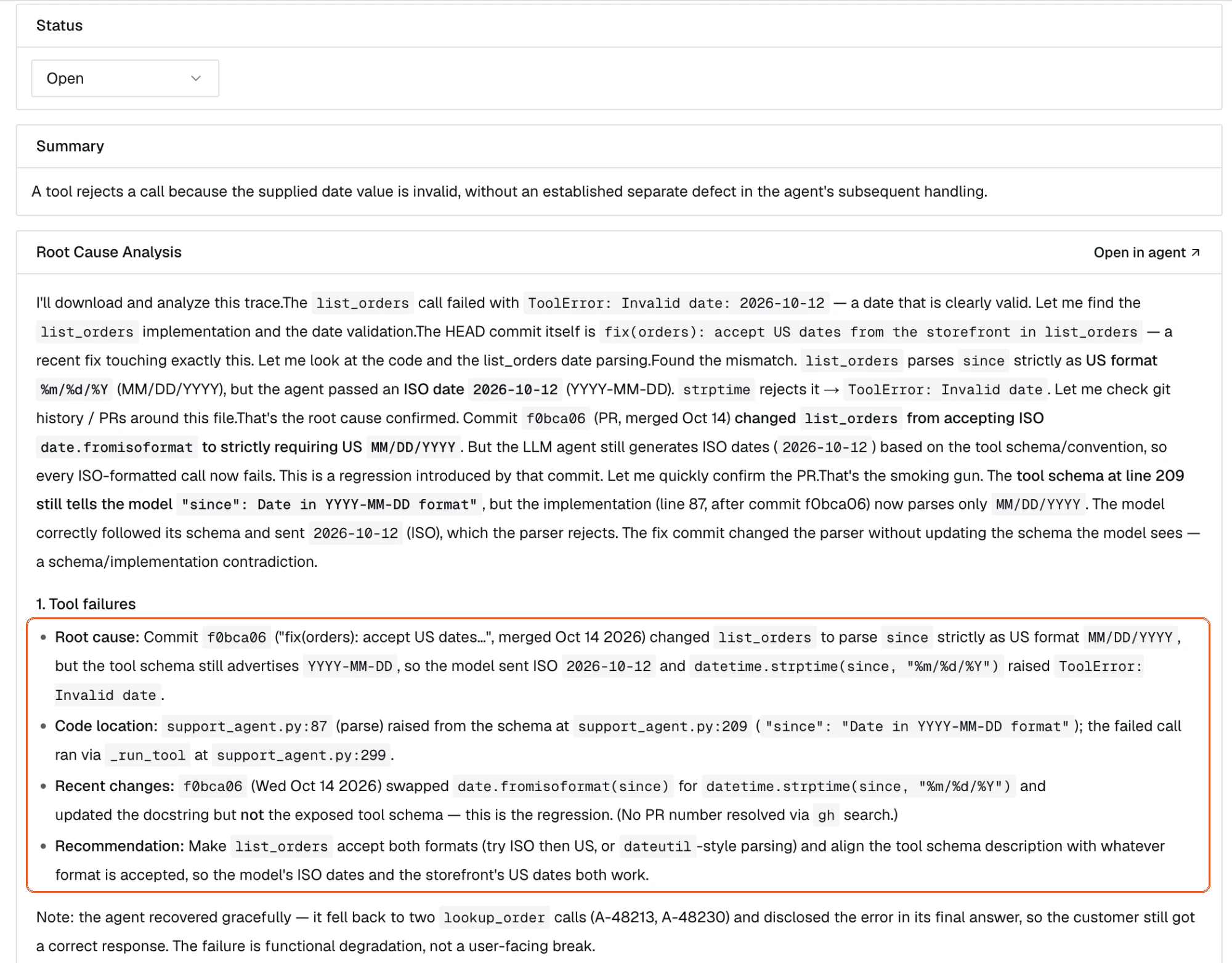
A pull request is optional. If you ask for one, the agent writes the fix and opens a pull request on a new branch through the GitHub App, linked to the trace, for an engineer to review. It never pushes to main.
Phoenix ships PXI, in beta, which Arize describes as "a coding agent pointed at your observability data instead of a codebase". It walks failing traces and proposes root causes, iterates on prompts and queries your Phoenix data. Since September 2026 it can file a GitHub issue that links the traces it looked at, after you approve it.
| Dimension | Arize Phoenix | traceroot |
|---|---|---|
| What the agent reads | Your Phoenix data | Traces and a sandbox clone at the traced commit |
| Started by | You, on request | A new or reopened Signal, or manual |
| Output | Proposed root cause | Root cause, code location and fix |
| GitHub | Issue, after approval | Optional pull request |
| Your own model key | OpenAI, Anthropic, Gemini, Bedrock or custom | 11 providers, every plan |
A CLI your coding agent can use
Both projects ship a CLI for coding agents, and both have a guided setup. npx @arizeai/phoenix-cli setup detects your framework and installs the matching OpenInference instrumentation, and px reads traces, spans, datasets, experiments and annotations.
traceroot setup signs you in, writes a project API key into your env file, has Claude Code or Codex add the SDK, and waits for the first trace. After that, the CLI is built around the improvement loop. An agent can list flagged traces, read one with its root cause analysis, and export a trace with its git context into the repository it is editing. It can run project-scoped, read-only SQL over spans and traces, and create, update and delete detectors, alerts, dashboards and projects. Every command takes --json, and exit codes are documented.
| Dimension | Arize Phoenix | traceroot |
|---|---|---|
| Guided setup | npx @arizeai/phoenix-cli setup |
traceroot setup |
| Health check | px auth status |
traceroot doctor |
| Skills for coding agents | px skills |
traceroot skills install |
| Judged traces | px trace-annotations |
traceroot findings list and get |
| Trace export | px trace and px span |
traceroot traces export |
| Read-only queries | GraphQL via px api graphql |
SQL via traceroot sql |
| Detectors and alerts as code | — | traceroot detectors and alerts |
Evaluation as the verify step
A fix is done when it is checked. Both tools run offline experiments over datasets, with code and LLM-judge scorers.
traceroot evaluations run your system over a dataset, and each case runs as a trace, so the cost and span views you use in production work for the eval too. Scorers can be code or an LLM judge. Label a run with the pull request's commit, compare it with the current version on the same immutable dataset version, and merge when it holds.
Phoenix runs experiments over datasets from its SDKs or the playground. Evaluators attached to a dataset run server-side on every experiment, and code evaluators run in a sandbox (Server Evals).
Pricing and retention
Self-hosted Phoenix has no license fees (Self-Hosting); you pay for the machines it runs on. Arize's managed option is priced as Arize AX. traceroot Cloud is priced by events, where a trace and each of its spans count as one event, in blocks of 50k (usage metering). Plan details are from the traceroot pricing page and the Arize AX pricing page.
| Dimension | Arize AX | traceroot |
|---|---|---|
| Free | $0: 25k spans a month, 1 GB, 15-day retention | $0: 50k events a month, 15-day retention, 2 seats |
| First paid plan | AX Pro, $50 a month: 50k spans, 10 GB, 30-day retention | Starter, $30 a month: 150k events, 30-day retention, unlimited seats |
| Next plan | Enterprise, custom | Pro, $200 a month: 90-day retention |
| Overage | $0.0008 a span, $3 a GB | $4 per 50k events |
| Own model key for agent features | Enterprise | Every plan |
A worked example: an agent that runs 100 times a day, with 10 spans per run. Over 30 days that is 3,000 traces and 30,000 spans.
| Dimension | Arize AX | traceroot |
|---|---|---|
| Plan that fits | AX Pro, $50 | Free, $0; Starter, $30 to judge every run |
| Retention | 30 days | 15 days |
At 1,000 runs a day, traceroot meters 330,000 events: Starter's 150k plus four extra blocks of 50k, or $46 a month. Arize AX Pro meters 300,000 spans, 250,000 over its 50k, which is $50 plus $200 at $0.0008 a span, or at least $250 a month before any extra GB.
Which should you choose
Choose traceroot if you want an open-source, self-hostable platform built to keep improving agents in production. Detectors judge production traces on the server, flagged traces become Signals with full GitHub context, the root cause analysis agent reads your repository at the recorded commit, and a pull request is one optional step away, with a CLI your coding agent can drive. At 100 runs a day with every run judged, it costs $30 a month on Starter against $50 on Arize AX Pro, and spans sit in ClickHouse in the same open-source code you self-host.
Choose Arize Phoenix if you want a free, self-hosted tool for tracing, evals, datasets and experiments that you run and scale on your own database.
Choose Arize AX if you want Arize to run the platform for you, with Signal, monitors and the adb datastore, and you do not need it to be open source.
Both speak OpenTelemetry and OpenInference, so the easiest way to decide is to send one agent's traces to traceroot next to what you run today.
Switching from Phoenix
You do not have to switch in one step.
- Run
npx -y traceroot-cli@latest setupin the repository of one agent. If that agent already uses OpenInference instrumentors, they keep working, because the traceroot SDKs use the same ones. - Keep Phoenix running while you compare. OpenTelemetry lets one tracer provider export to more than one endpoint, so the same spans can reach both.
- Write a detector for one failure you already know about, and connect the GitHub App so root cause analysis can read your code at the recorded commit.
- Compare what each tool tells you about the same failures for a week or two, then move datasets and experiments when you are ready.
Get started
Install the CLI and run traceroot setup in the repository of one agent. Pick one failure you have already worked through by hand, so you know what a correct diagnosis looks like, then write a detector that describes it in plain language. The code is on GitHub.
FAQ
Is traceroot an open-source Arize Phoenix alternative? Yes. traceroot is open source and self-hostable. It judges production traces with detectors, groups flagged traces into Signals, investigates them against your repository at the recorded commit, and can optionally open a pull request for review.
Is Arize Phoenix open source? Phoenix's code is public. The server and the Python evals package are under the Elastic License 2.0, which allows self-hosting but not offering Phoenix to others as a hosted service. The OTel helper, the Python client, the TypeScript packages and OpenInference are under Apache 2.0. Arize AX, Arize’s commercial platform, is not open source: Arize runs it for you, or you self-host it under a commercial license.
Is Phoenix still maintained after Dynatrace acquired Arize? Yes, according to Dynatrace. Its October 1, 2026 announcement says Arize will continue supporting both Phoenix and AX (press release).
Can I keep my OpenInference instrumentation? Yes. traceroot's Python and TypeScript SDKs are built on the OpenInference instrumentors, and its ingest worker reads OpenInference span kinds.
Does Phoenix record the commit on production traces? Not by itself. phoenix.otel.register() does not add repository or commit attributes; you can add them as your own attributes. traceroot's SDK resolves the repository and Git ref and stamps them on every span.
How is a traceroot Signal different from Phoenix evals on traces? A traceroot detector runs on the server for each sampled trace, and flagged traces are grouped into Signals that reopen on regression. In Phoenix, you run evals on exported traces from your own code and log the results as annotations; scheduled failure grouping is Arize AX's Signal.
How does PXI compare with traceroot's agent? PXI works over your Phoenix data and can file a GitHub issue. traceroot's agent works in a sandbox with a clone of your repository at the traced commit, returns a root cause with the code location, and can optionally open a pull request.
How does pricing compare? Self-hosted Phoenix has no license fees, and Arize AX Pro is $50 a month for 50k spans. traceroot Cloud has a free plan with 50k events a month, and Starter is $30 a month for 150k events.
Do I need to give traceroot access to my repository? Only for root cause analysis and pull requests. Tracing works without it.
All Phoenix facts were checked against Phoenix's public documentation and repository in November 2026. If something has changed, tell us on GitHub.